

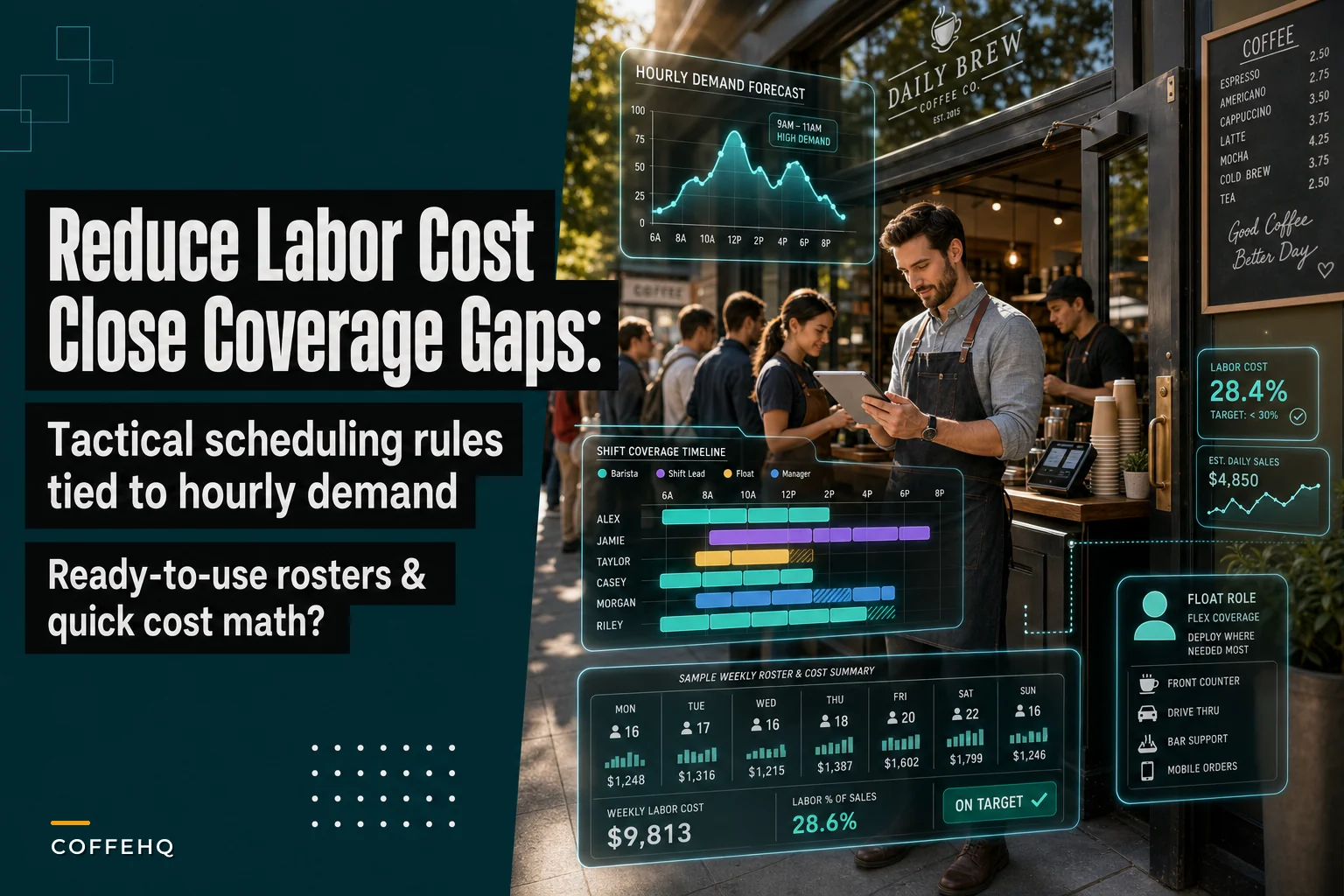

Last week I watched a cafe owner stare at her POS data showing $1,800 revenue during morning rush while her five baristas tripped over each other behind the counter. Meanwhile, at 2 PM she had three people standing around while serving maybe twelve customers an hour. Classic overstaffing problem that burns through roughly $400 weekly in unnecessary labor.
Coffee shop staff scheduling feels impossible because most owners schedule based on gut feeling or copy what worked three months ago. Customer patterns shift constantly. That promotion you ran last month? It moved your Tuesday peak from 8 AM to 9:30 AM. The office building next door switching to hybrid work? Your Wednesday afternoons just died.
Bad scheduling creates a domino effect. Your best baristas get frustrated working dead shifts. New hires get thrown into rush hour chaos without proper support. Labor costs creep up to 38% when they should sit around 28-30%. And somehow you still have customers walking out during peak because service is too slow.
Why standard scheduling templates fail coffee shops
Most scheduling advice tells you to build a "base schedule" and stick with it. Create your standard Monday schedule, copy it week after week, adjust for vacations. Sounds logical until reality hits.
Coffee shops face unique scheduling challenges that generic retail advice misses. Your demand swings aren't just daily — they're hourly. A typical morning might see 140 customers between 7-9 AM, then drop to 25 customers from 10-11 AM. That's an 82% drop in demand while your fixed schedule keeps the same coverage.
Weather completely scrambles patterns too. Rain on a Saturday morning? Your usual 200-customer rush becomes 110 customers spread across four hours instead of concentrated in two. But you already scheduled five people for that rush that never materialized.
Then there's the skill factor nobody talks about. Having three bodies on the floor means nothing if none of them can properly steam milk during a rush. One experienced barista running register and espresso beats two newbies fumbling through orders every time.
The hidden issue is role confusion during transitions. At 10 AM when demand drops, who switches from barista to cleaning? Who handles the wholesale order that just arrived? Without clear transition rules, everyone either does nothing or duplicates work.
The three scheduling rules that actually control labor costs
Three tactical approaches consistently reduce labor spend while improving coverage. Not theory — these are patterns from shops that successfully dropped labor percentage without sacrificing service.
Keep every order and shift perfectly aligned.
Coffehq helps you manage orders, inventory, and staff schedules seamlessly.
- Unified order processing
- Real-time inventory updates
- Staff shift coordination
No credit card required
Rule 1: Staggered breaks create natural coverage buffers
Instead of sending people on break when it's slow (which sounds logical), schedule breaks 30 minutes before and after your demand peaks. Your 7 AM rush starts at 7:30? First break goes at 6:30 AM, last break at 9:30 AM. During the actual rush, everyone's on the floor.
The math works because you're already paying for the coverage. A 15-minute break costs you the same whether taken at 7 AM or 10 AM. But taking it at 10 AM means you need extra coverage during the morning rush to compensate.
Rule 2: Float roles eliminate position bottlenecks
Assign one person per shift as the "float" — they're trained on register, bar, and support tasks. When register gets slammed, they jump on second register. When milk runs low, they're restocking. This isn't about having a utility player; it's about having someone whose specific job is identifying and fixing bottlenecks in real-time.
One shop tracking this saw average transaction time drop from 4.2 minutes to 3.1 minutes just by having a float who could jump between positions. That's 25% more customers served with the same staff count.
Rule 3: Block scheduling around demand curves, not clock hours
Stop thinking in hourly blocks. Your demand data shows rushes from 7:15-9:45 AM and 11:30 AM-1:15 PM? Schedule blocks that match: 6:45 AM-10:00 AM and 11:00 AM-2:00 PM. The 15-30 minute buffers handle setup and breakdown.
Stagger breaks around peak demand windows rather than when it feels slow to maintain consistent coverage.
Customer demand doesn't care about round numbers. Matching reality beats matching the clock.
Converting hourly demand data into actual schedules
Most scheduling articles hand-wave with "use your POS data to determine peak times." How do you actually convert transaction data into staff schedules?
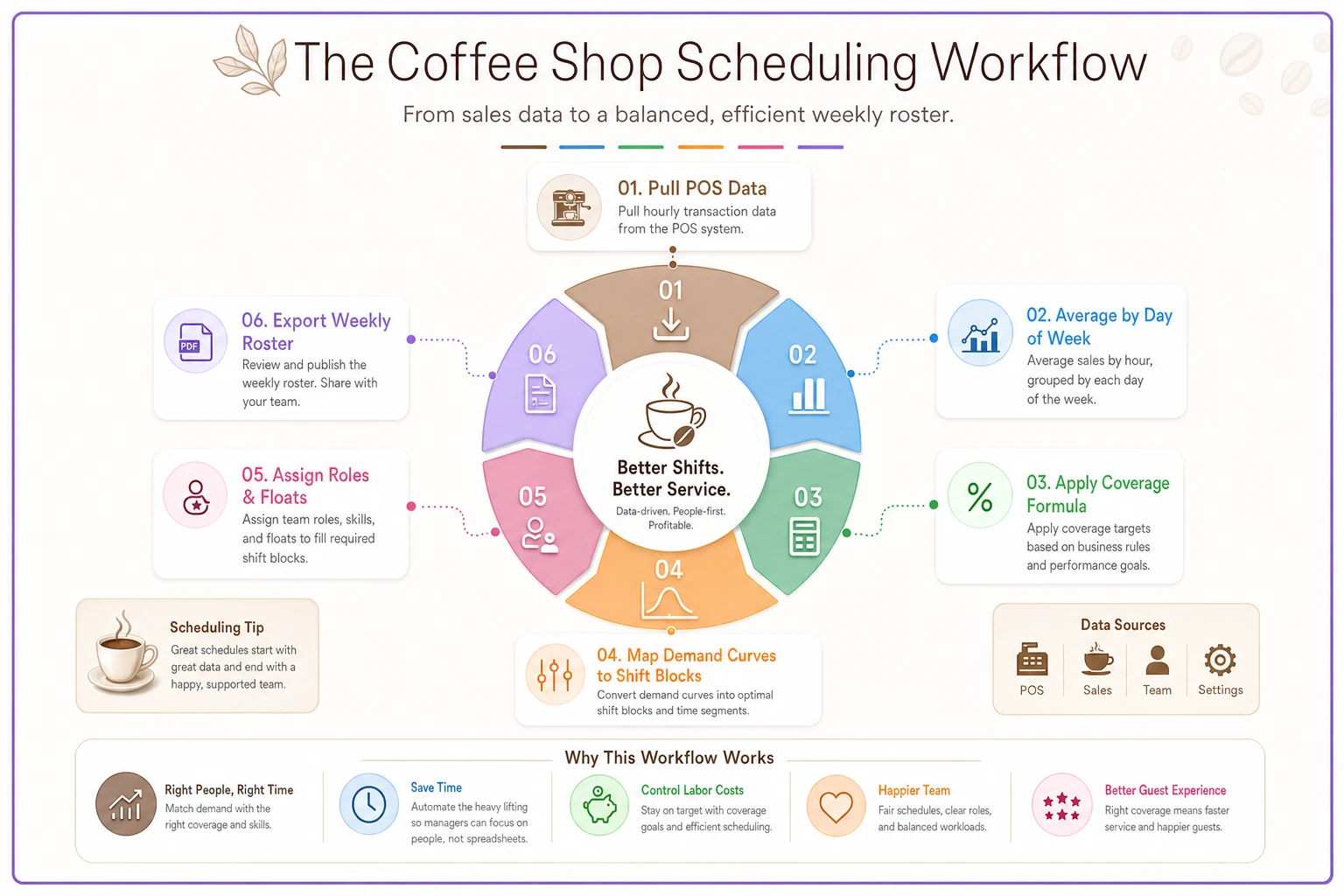
Start by pulling hourly transaction counts for the past 8 weeks. Don't use revenue — a $15 catering order skews everything. Count actual transactions. Average each hour by day of the week. You'll see patterns like: Monday 7-8 AM: 42 transactions Monday 8-9 AM: 68 transactions Monday 9-10 AM: 31 transactions Monday 10-11 AM: 18 transactions
-
Under 20 transactions/hour
2 people minimum (one register, one bar)
-
20-40 transactions/hour
3 people (register, bar, float/support)
-
40-60 transactions/hour
4 people (register, two bar, float)
-
Over 60 transactions/hour
5+ people (two register, two bar, dedicated support)
These aren't random numbers. Below 20 transactions, you still need two people for safety and basic operations. Above 60, you hit physical equipment limits — your espresso machine can only pull so many shots regardless of staffing.
Below is a workflow graphic showing the process from POS hourly transactions to final roster.
Don't staff for average hourly demand. Staff for 75th percentile demand. If Monday 8 AM averages 68 transactions but hits 78 transactions once every four weeks, staff for 75. The extra labor cost is minimal compared to losing customers from long waits.
Sample weekly roster with position assignments
Here's an actual weekly schedule that balances coverage with cost control. This is for a shop averaging $8,500 weekly revenue with target labor at 28%.
Monday (Projected: $1,100 revenue, 380 transactions)
| Time | Staff | Position |
|---|---|---|
| 6:30 AM - 11:00 AM | Sarah | Opener/Bar Lead |
| 7:00 AM - 11:30 AM | Marcus | Register/Float |
| 7:30 AM - 12:00 PM | Jamie | Bar Support |
| 11:00 AM - 3:30 PM | Alex | Midday Lead/Register |
| 11:30 AM - 4:00 PM | Taylor | Bar/Float |
| 3:00 PM - 8:00 PM | Chris | Closer/Bar |
| 3:30 PM - 8:00 PM | Sam | Register/Support |
Total hours: 38.5 Labor cost (avg $16/hr): $616 Labor percentage: 56% of daily revenue
That seems high. But Monday's your slowest day — you're carrying infrastructure cost. The key is looking at weekly percentages, not daily.
Tuesday through Thursday follow similar patterns with adjustments. Add one extra 10 AM - 2 PM shift on Thursday for higher lunch traffic. Extend closing shift to 9 PM on Thursday for evening study crowd. Stagger start times by 15 minutes to smooth transitions.
Friday (Projected: $1,450 revenue, 490 transactions)
| Time | Staff | Position |
|---|---|---|
| 6:00 AM - 10:30 AM | Sarah | Opener/Bar Lead |
| 6:30 AM - 11:00 AM | Marcus | Register Lead |
| 7:00 AM - 11:30 AM | Jamie | Bar |
| 7:00 AM - 11:30 AM | Pat | Float/Support |
| 10:30 AM - 3:00 PM | Alex | Midday Lead |
| 11:00 AM - 3:30 PM | Taylor | Register |
| 11:30 AM - 4:00 PM | Jordan | Bar |
| 2:30 PM - 9:00 PM | Chris | Closer/Bar Lead |
| 3:30 PM - 9:00 PM | Sam | Register |
| 4:00 PM - 9:00 PM | Casey | Bar/Support |
Total hours: 52 Labor cost: $832 Labor percentage: 57% of daily revenue
Weekend adjustments are straightforward. Saturday mirrors Friday but starts 30 minutes later (6:30 AM first shift). Sunday reduces to single bar during mid-afternoon lull (2-4 PM).
Weekly totals: 251 hours, $4,016 labor cost, 28.2% of $14,250 weekly revenue
Notice how shifts overlap by 30-60 minutes during transition periods? That's when your senior staff trains newer employees, handles prep, and ensures smooth handoffs. The overlaps cost more upfront but prevent the chaos that happens when one person leaves and their replacement has no idea what's happening.
The actual cost math managers never calculate
Everyone calculates hourly wages. Almost nobody calculates the real cost of scheduling mistakes.
Overstaffing math:
Extra person during slow period (2-5 PM): $16/hour × 3 hours = $48/day Weekly impact: $48 × 7 = $336 Annual impact: $17,472
That's a whole part-timer's annual wages burned on dead shifts.
Understaffing math is worse:
Lost customers during rush (5 walkouts at average $7 ticket): $35/day Extended wait times reducing frequency (10% fewer repeat visits): ~$110/day in lost future sales Staff burnout leading to turnover: $1,200 training cost per replacement Annual impact: Easily $35,000+ in combined losses
But here's the calculation that really matters — optimal vs actual coverage efficiency:
Optimal schedule (matching demand): 28% labor cost Typical "gut feel" schedule: 34% labor cost Difference on $500k annual revenue: $30,000
That $30,000 is pure profit you're leaving on the table through poor scheduling.
Block scheduling strategies for different demand patterns
This is about grouping work into focused time blocks instead of spreading tasks across entire shifts:
Morning rush block (6:30 AM - 10:00 AM): All hands focused on service. No deep cleaning. No inventory counts. Prep only if critically low. Breaks prohibited 7:00-9:30 AM.
Transition block (10:00 AM - 11:30 AM): Senior barista stays on bar. Others rotate through: bathroom cleaning, pastry rotation, milk dating, register counting. Prep for lunch rush. Staggered breaks.
Lunch rush block (11:30 AM - 2:00 PM): Similar to morning but with food focus. Dedicated food runner if over 15 food orders/hour. No equipment cleaning beyond essential wipe-downs.
Afternoon maintenance block (2:00 PM - 4:00 PM): Deep clean rotation. Inventory and ordering. Training opportunities. Equipment maintenance. Prep for next day.
The mistake shops make is trying to multitask during blocks. When someone's in a service block, they do nothing but service. When they're in maintenance block, they're off the floor completely. This focused approach typically improves task completion by 40% compared to constant task-switching.
Implementation realities and what breaks
Perfect schedules collapse the moment real life hits. Your opener calls in sick. A tour bus dumps 30 customers during your planned lull. The espresso machine starts pulling shots slow.
Build coverage redundancy into your schedule without overstaffing. Every shift needs two people who can run register and two who can make drinks. Sounds obvious, but schedules all the time have only one register-trained person until 10 AM. When they're late, the whole operation stops.
Create explicit contingency rules. When someone calls out, who gets called first? Who can extend their shift? Who's on-call? Without clear rules, managers waste 45 minutes making phone calls while the remaining staff drowns.
The 80% rule saves you from yourself: if your schedule requires more than 80% productivity from your team to function, it's too tight. Humans aren't machines. They need bathroom breaks, they have off days, they stop to help confused customers. Build in breathing room or watch your team burn out.
Track schedule performance weekly. Not just labor percentage — track customer wait times, staff overtime, and task completion rates. When cleaning tasks consistently get skipped, that's a scheduling problem, not a staff problem. Data tells you what's actually working versus what looks good on paper.
Software that makes this actually manageable
Manually calculating demand curves and optimizing schedules takes hours every week. Smart operators set up systems that handle the heavy lifting automatically.
Modern operational platforms can pull your POS data, identify patterns, and suggest optimal schedules based on actual demand. The good ones learn your specific patterns — that weird Tuesday afternoon rush that happens only when the community center has events, or the Thursday morning dead zone when the office nearby does all-hands meetings.
AI-powered scheduling tools now track individual employee productivity and automatically assign your strongest baristas to highest-demand slots. They factor in availability, overtime risk, and skill mix to build schedules that actually work. More importantly, they can adjust on the fly when someone calls out or demand spikes unexpectedly.
The automation handles the tedious parts — calculating coverage ratios, ensuring compliance with break laws, preventing unauthorized overtime. This frees managers to focus on training, customer service, and the human elements that software can't replace.
What we've learned building these systems is that the best approach combines algorithmic optimization with human oversight. The software suggests schedules based on data, managers adjust based on team dynamics and upcoming events the system might not know about. It's operational assistance, not replacement.
Making schedules stick in reality
The best schedule means nothing if your team ignores it. Implementation is where most coffee shops fail, even with perfect plans.
Start by showing your team the why behind schedule changes. Share the actual data — "Tuesday afternoons average 18 transactions per hour, that's why we're reducing coverage." Transparency builds buy-in. When staff understand they're not being cut arbitrarily, they're more likely to accept changes.
Post the complete schedule where everyone can see it, with clear position assignments. Not just "Sarah 7-12" but "Sarah 7-12 (Bar Lead, Train Jamie on milk steaming)." Ambiguity kills efficiency.
Run the new schedule for two full weeks before adjusting. Week one is always chaos as people adapt. Week two shows you what actually needs fixing. Changing too quickly means you never know if the problem was the schedule or the adjustment period.
Coffee shop scheduling is never finished. Customer patterns shift seasonally, staff skills evolve, new competition opens nearby. The shops that thrive are ones that treat scheduling as an ongoing optimization process, not a set-it-and-forget-it task.
But when you nail it — when your labor percentage drops while customer satisfaction rises, when your staff stops complaining about dead shifts and impossible rushes, when you can predict next week's labor cost within $50 — that's when coffee shop operations becomes manageable instead of chaos. The math isn't complicated. The discipline to follow it is what's hard.
Ready to brew operational excellence?
Join hundreds of coffee shops using Coffehq to boost efficiency, reduce waste, and elevate customer satisfaction.