

Most cafe owners don't need a warehouse-grade traceability system. They need to answer boring but expensive questions fast: which bag of oat milk went into the batch a customer complained about, when did that case of cold brew concentrate actually arrive, and why does the Sunday night count never match Thursday's invoice.
Barcode traceability solves that. And contrary to what most vendors will tell you, you don't need a six-week integration project or a $2,000 rugged scanner. A functional setup can be running between a Saturday morning open and a Sunday afternoon close, using hardware that costs less than a decent espresso grinder's tamper station.
This plan is built for a single site with 60–150 tracked SKUs, one or two people doing receiving, and a manager who wants to stop guessing.
What you're actually solving (scope this before you buy anything)
The mistake almost everyone makes is trying to barcode everything. You don't scan every lemon. You scan the things that cause real money problems when they go untracked.
In practice, that's three categories:
-
Perishables with short windows — milk, alt-milks, cream, cold brew concentrate, pastries received wholesale, prepped syrups.
-
High-value or theft-prone stock — whole bean bags (retail), bottled drinks, branded merch, bulk syrups.
-
Anything that shows up in a recall or complaint — dairy, allergen-heavy items, anything with a lot code on the case.
A typical single-site cafe lands around 70–90 SKUs worth tracking. If your list is pushing 200, you've included things that don't need it. Cut the salt, the napkins, the to-go lids. Those get counted, not scanned.
Getting scope right is also tied to how your ordering behaves. If par levels are still guesswork, barcode data won't fix that on its own — it just makes the guessing visible. Worth reading our take on how to calculate perishable par levels and reorder points alongside this, because traceability and par math genuinely feed each other.
The hardware: what to actually buy
For a cafe, a $15 USB barcode scanner and a phone camera app cover about 95% of what you need. The expensive rugged scanners are built for cold storage and forklift traffic — not your back room.
Keep every order and shift perfectly aligned.
Coffehq helps you manage orders, inventory, and staff schedules seamlessly.
- Unified order processing
- Real-time inventory updates
- Staff shift coordination
No credit card required
| Item | Option | Rough cost | Notes |
|---|---|---|---|
| Handheld USB scanner | Wired 1D/2D (plug-and-play) | $15–$35 | Acts like a keyboard. No drivers. Best value. |
| Wireless scanner | Bluetooth 2D handheld | $40–$70 | Useful if receiving station is away from the computer. |
| Phone as scanner | Free/low-cost scan app | $0–$10/mo | Fine for low volume; slower for big deliveries. |
| Label printer | Thermal (direct thermal, 2" wide) | $80–$130 | Skip ink. Direct thermal rolls are cheap. |
| Thermal label rolls | 2.25" x 1.25" direct thermal | $10–$20 / 1,000+ labels | Buy waterproof/oil-resistant for the fridge. |
| Mount / stand | Basic scanner stand | $8–$15 | Lets you scan hands-free during receiving. |
A full setup for one site lands somewhere around $120–$250. If you already have a spare tablet or laptop at the receiving area, you're at the low end.
One thing worth flagging: buy direct thermal labels rated for cold and moisture. Standard paper labels curl and smear inside a walk-in within two days, and a smeared barcode is worse than no barcode — it looks like it's working until the scan fails at the worst moment.
Label templates: keep the data on the label, not in someone's head
A traceability label doesn't need to be pretty. It needs to survive a fridge and answer four questions: what is it, when did we get it, when does it expire, and which batch.
A workable label layout for a received perishable:
-
SKU name + internal code (e.g.
OATMILK-BARISTA / 1042) -
Barcode (your internal SKU barcode, not the manufacturer's UPC — more on why below)
-
Received date
-
Use-by / discard date
-
Lot or delivery reference (invoice number works fine)
For prepped items — syrups, cold brew batches, prepped dairy — add a prepped-by initials field. When something goes wrong, "who made this batch" is the question that saves you an hour of back-and-forth.
Keep two label templates only:
-
Received-stock label — printed when a delivery lands.
-
Prepped-batch label — printed when someone makes something in-house.
Two templates is intentional. The moment you have eight label formats, staff stop using the right one and you're back to Sharpie on masking tape.
Why you barcode your *own* SKU, not the manufacturer's UPC
This trips up almost every first-timer. Manufacturer UPCs seem convenient — they're already on the case. But they break traceability in three ways:
-
The same UPC covers every delivery, so you can't tell Tuesday's case from Friday's.
-
Different vendors sometimes ship the same product under different UPCs.
-
When you swap brands during a shortage, the whole system breaks.
Your internal SKU code stays stable regardless of what shows up on the truck. That's the entire point — you're mapping your product idea ("barista oat milk") to whatever physical item fulfills it this week. This is the same discipline that makes a clean purchase-to-stock flow actually hold together: stable internal codes on one side, messy vendor reality on the other.
SKU mapping: the Saturday morning job
This takes the most focus and the least money. Block two to three hours.
-
Pull your tracked list — the 70–90 SKUs from your scoping step.
-
Assign each an internal code. Keep it human-readable
MILK-WHOLE,MILK-OAT,SYRUP-VAN,BEAN-RETAIL-HOUSE. Avoid pure numbers — staff read these off shelves. -
Map each internal SKU to its vendor(s). One SKU can have a primary and a backup vendor. Note pack size (case of 12, each, etc.).
-
Set the discard rule per SKU. "Received date + 7," "prepped + 3 days," etc. This drives the use-by field on labels.
-
Generate a barcode per internal SKU and print a small sheet of master labels you can reprint from.
-
Do a physical walk-through. Stick a code sheet at each storage location and confirm nothing's missing.
Keep SKU codes human-readable — staff read these off shelves.
The most common mapping mistake is creating separate SKUs for the same functional item across vendors. If "oat milk" is one SKU regardless of brand, your counts and reorder logic stay clean. Split it, and you'll be reconciling phantom shortages for months.
Operational platforms that use AI to reconcile invoices against received stock lean heavily on this internal-SKU discipline — the cleaner your mapping, the more the software can auto-match deliveries and flag mismatches without a human checking every line. But the mapping has to be right first. No automation rescues a messy SKU list.
The daily scan SOP (keep it under 90 seconds per delivery)
Traceability dies when scanning feels like extra work. The SOP has to be fast enough that someone mid-rush will still do it.
On receiving:
-
Open box, confirm quantity against invoice.
-
Print received-stock labels (batch print for the whole delivery).
-
Scan each label as you apply it — this logs it into stock.
-
Stick labels facing outward so the barcode is scannable without moving the item.
-
Rotate
new stock behind old.
On prepping (syrups, batches, prepped dairy):
-
Make the batch.
-
Print a prepped-batch label with prepped-by initials.
-
Scan it in.
-
Apply, front-facing.
On discard/waste:
-
Scan the item out before it hits the trash.
-
Tag reason
expired, spilled, comped.
That last step is the one people skip, and it's the one that quietly matters most. Scanning waste out is how you discover you're throwing away four liters of oat milk every Wednesday — which is a par problem, not a bad-luck problem.
Workflow: how a delivery moves through your system
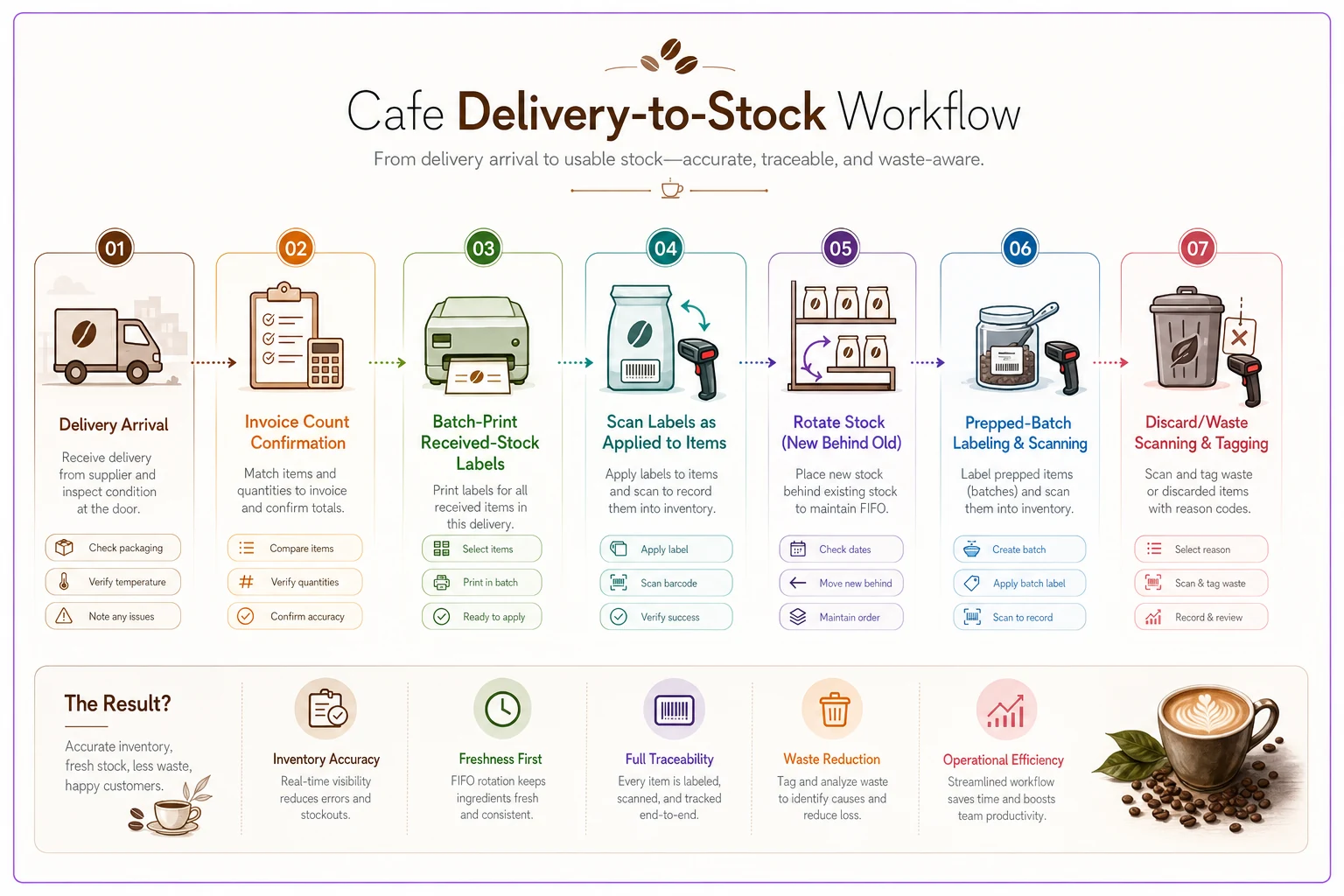
A quick visual of the delivery-to-discard workflow.
A real scenario
A two-register neighborhood cafe — roughly 220–260 transactions a day, one walk-in fridge, a rotating cast of four baristas — kept losing the argument with its dairy invoices. Sunday counts were off by a case or two most weeks, and nobody could say whether it was theft, over-pouring, or a short delivery.
They spent about $160 on hardware: a $28 wired scanner, a $95 thermal printer, labels, and a stand. Saturday was scoping and SKU mapping (81 tracked SKUs). Sunday was labeling existing stock and running the first live delivery through the SOP.
Within the first month, the interesting finding wasn't theft at all. Scanned waste data showed they were discarding roughly 6–9 liters of alt-milk a week to expiry — mostly because two overlapping standing orders were double-covering the same par. They trimmed one recurring order. Dairy count variance dropped from a case or two down to "a carton here and there," and the waste line on alt-milk fell by somewhere in the range of $40–$70 a week. Not a dramatic number, but it paid back the hardware inside a month and kept paying.
The point isn't the savings. It's that they finally knew where the leak was instead of guessing.
30-day verification checklist
Rolling it out is the easy part. Making it stick is harder. Run through this in the first month:
-
[ ] Day 1–3 Every delivery scanned in. Spot-check that labels survived the fridge.
-
[ ] Day 5 Reprint any smeared or curled labels. Confirm you bought moisture-rated rolls if not.
-
[ ] Day 7 First weekly count — does scanned stock roughly match physical count? Note the gap.
-
[ ] Day 10 Check the waste log. Is discard scanning actually happening, or getting skipped during rushes?
-
[ ] Day 14 Review any SKU with repeated count mismatches. Usually a mapping error, not shrinkage.
-
[ ] Day 14 Confirm prepped-batch labels include initials. If they're blank, retrain.
-
[ ] Day 21 Look for SKUs never scanned out — either they're not moving or waste isn't being logged.
-
[ ] Day 25 Time a live delivery. If it's taking over two minutes, simplify labels or batch-print earlier.
-
[ ] Day 30 Full reconciliation. Compare month-one variance to your old guess-based counts.
-
[ ] Day 30 Kill any tracked SKU that generated no useful signal. Tighten scope.
If by day 30 your counts are landing closer and your waste log is telling you something you didn't know before, it worked. If half the SKUs aren't being scanned, the problem is almost always the SOP taking too long — go back and cut label complexity before you blame the staff.
When this makes sense — and when it doesn't
Worth doing if: you have recurring count mismatches on dairy or high-value stock, you've had a complaint you couldn't trace to a batch, or your waste is basically invisible. Also worth doing before opening a second site — traceability habits are far easier to build at one location than to retrofit across three.
Probably not worth it if: you have fewer than around 30 tracked items and one person does all receiving and genuinely remembers everything. At that scale, a good count sheet beats a scanner. The overhead of maintaining labels outweighs the payoff.
Who should hold off: cafes without stable par levels. Traceability shows you what moved; it doesn't tell you what should have moved. If ordering is still reactive, fix par logic first, then add barcodes so the data has something to measure against.
The one thing that actually determines success
Every failed cafe traceability rollout dies the same way — not from bad hardware, but from a scan step that took too long and quietly got dropped during a Saturday rush. Everything in this plan is built around keeping the daily action fast: two label templates, batch printing, hands-free scanning, internal SKUs that don't change when the vendor does.
Get the weekend setup right, protect the 90-second SOP, and run the 30-day check honestly.
Get the weekend setup right, protect the 90-second SOP, and run the 30-day check honestly.
That combination won't turn your cafe into some perfectly optimized operation overnight — but you'll spend a lot less of your Sunday nights arguing with an invoice, and a lot more of them actually closing the place on time.
Ready to brew operational excellence?
Join hundreds of coffee shops using Coffehq to boost efficiency, reduce waste, and elevate customer satisfaction.