

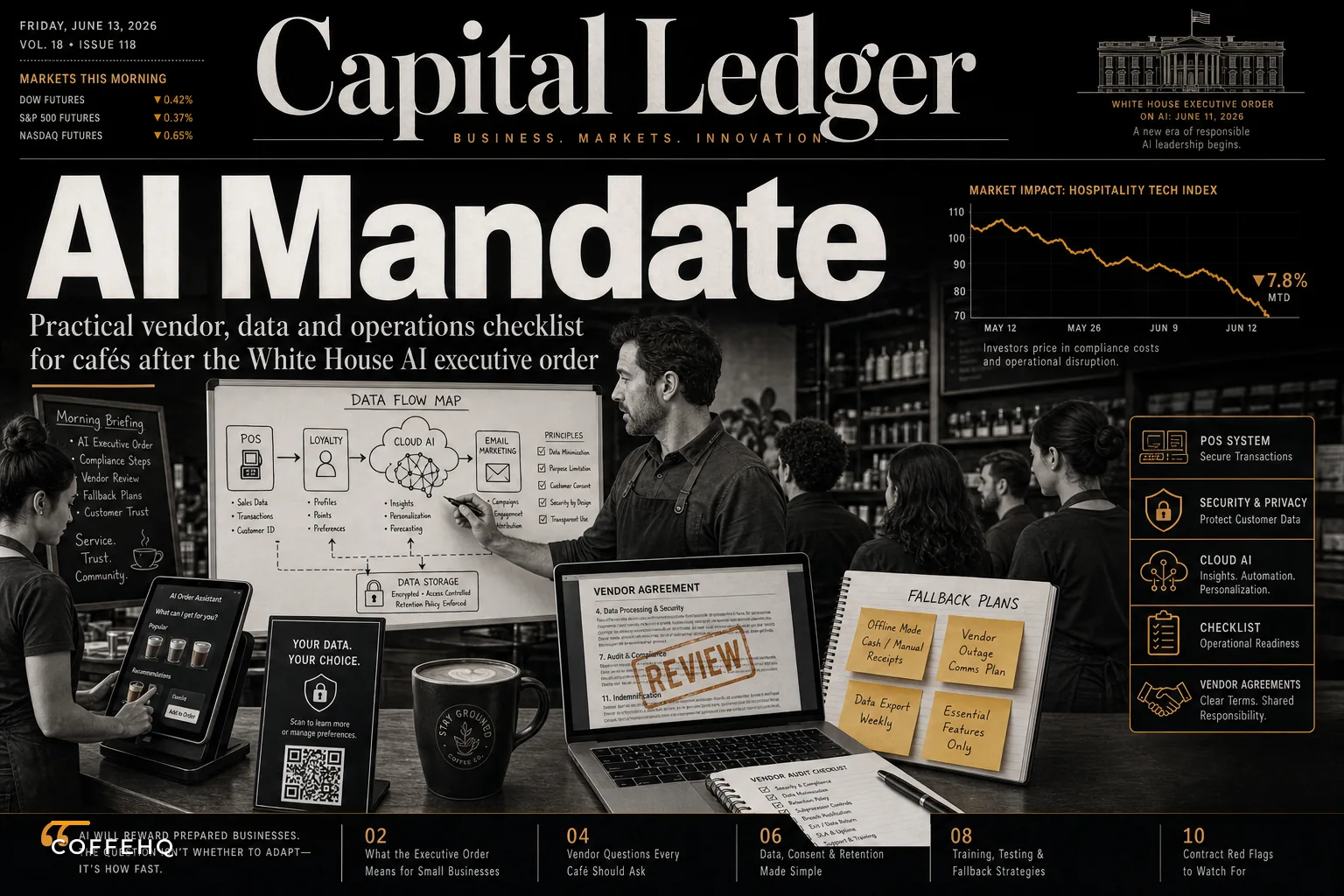

Monday morning. You're reviewing last week's mobile order data when your POS vendor emails about "exciting updates to align with federal AI guidance." By Wednesday, three more vendors have sent similar notices. Your loyalty app wants new permissions. Your scheduling software needs updated terms accepted by month-end.
The White House's new Executive Order on AI dropped June 2nd, and every tech vendor scrambled to interpret what it means for their products. For coffee shops already juggling mobile orders, loyalty programs, and maybe some predictive analytics for inventory, this creates an unexpected operational headache.
The order itself focuses on AI safety and security standards for federal contractors and large tech companies. But your vendors interpret these guidelines broadly, update their platforms preemptively, and suddenly you're dealing with feature changes, new data policies, and contract amendments that affect daily operations.
I watched this exact scenario play out after GDPR hit in 2018. Small cafés using European payment processors had to rebuild checkout flows overnight. The AI compliance push will be messier because it touches more systems — ordering, analytics, personalization, even shift scheduling if you're using predictive tools.
What's actually changing in your tech stack
Your vendors are making three types of changes right now, and each impacts operations differently.
First, data handling updates. That predictive ordering feature that suggests restock quantities based on weather and local events? It might need explicit customer consent now. Some vendors are adding toggles to disable AI features entirely rather than navigate compliance questions. Others are restricting data retention periods, which breaks year-over-year comparisons you might rely on for seasonal planning.
Second, accuracy and bias testing requirements. Vendors are adding disclaimers to AI-generated insights. That "estimated wait time" on mobile orders might show wider ranges. Personalized drink recommendations could default to simpler logic. One POS vendor I work with disabled their "smart staff scheduling" feature entirely last week because they couldn't document how it weighted different factors.
Third, security and access controls. Multi-factor authentication everywhere. New audit logs for who accesses customer data. Restrictions on exporting data to other tools. These changes slow down operations when you're trying to pull a quick report or sync data between systems.
The timing is brutal too. Vendors are pushing these updates during peak summer season when you're already stretched thin. And unlike a planned software upgrade where you get training materials and migration support, these compliance-driven changes often come with minimal notice and generic documentation.
The vendor audit you need to run this week
Start by listing every tool that touches customer data or uses any form of automation. Not just the obvious ones like your POS and mobile ordering platform. Include:
Keep every order and shift perfectly aligned.
Coffehq helps you manage orders, inventory, and staff schedules seamlessly.
- Unified order processing
- Real-time inventory updates
- Staff shift coordination
No credit card required
-
Email marketing tools that segment customers
-
Review management platforms that auto-respond
-
Shift scheduling software with predictive features
-
Inventory systems with demand forecasting
-
Social media schedulers with "optimal timing" features
-
Customer WiFi portals that track visits
For each vendor, document:
Current AI features you actually use. Most cafés only use 20% of available features. That AI-powered menu optimization tool might sound impressive, but if you're not actively using it, turn it off. Fewer active AI features means less compliance surface area to manage.
Data sharing between systems. Your POS probably shares data with your loyalty program, which feeds into email marketing, which connects to social media advertising. Map these connections. When one vendor changes data policies, it cascades through your entire stack.
Start with the systems that touch payments, loyalty, and customer contact info — they create the most immediate operational risk.
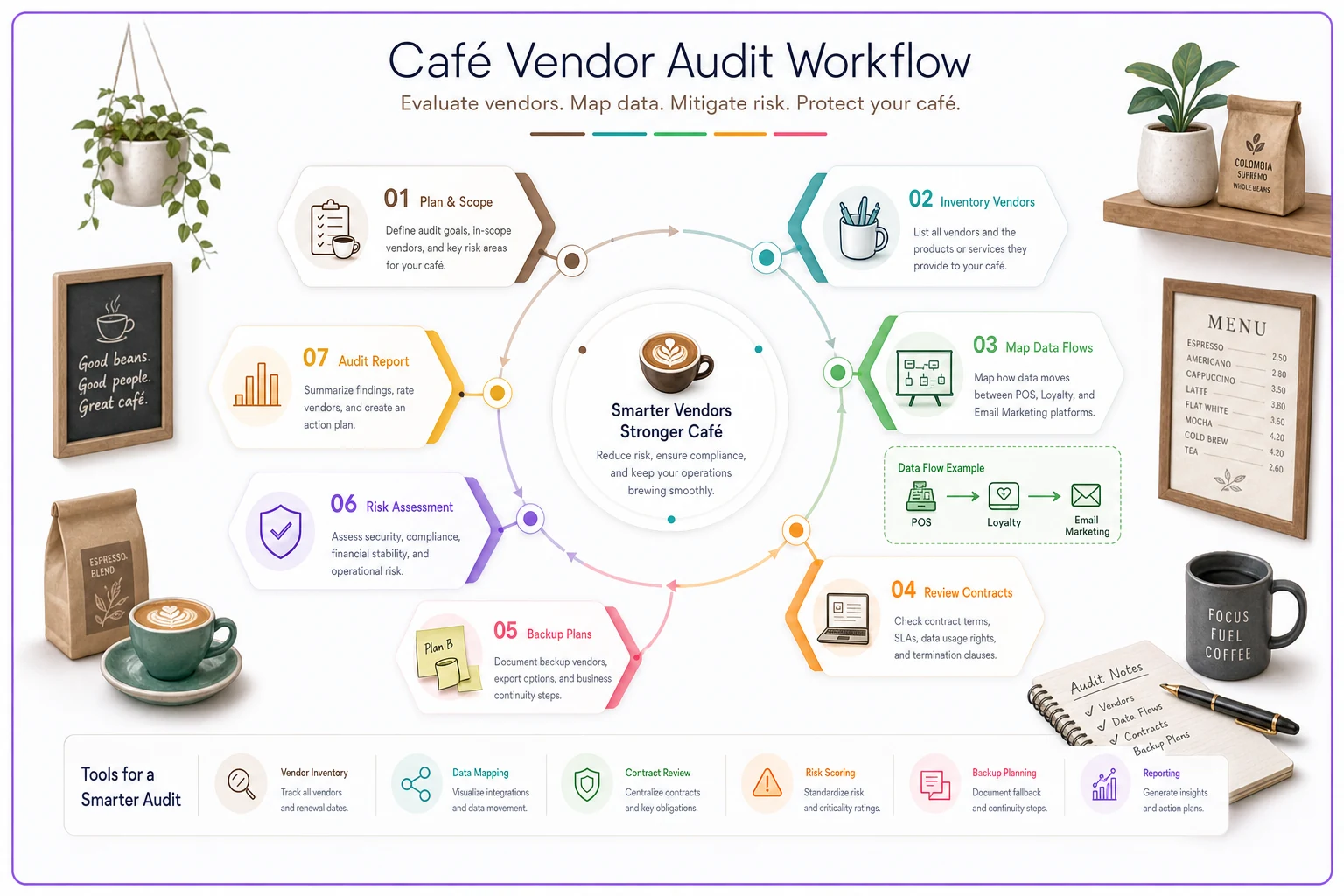
Contract terms and exit costs. Some vendors will use compliance updates to push new contracts with higher prices or longer terms. Know your current commitment levels and termination clauses before they corner you into unfavorable terms.
Backup plans for critical features. If your demand forecasting suddenly disappears, can you revert to manual ordering? If personalized marketing gets restricted, do you have broader campaign strategies ready?
Training gaps that will hurt you next month
Your team doesn't know these systems changed. That's the operational killer hiding in AI compliance updates.
Baristas won't understand why the "suggested upsell" prompt disappeared from the register. Shift leads will be confused when scheduling software stops auto-filling based on predicted traffic. Your marketing person might not realize why email open rates plummeted after personalization features got dialed back.
Create simple one-page guides for each role explaining what changed and the temporary workaround. Not lengthy training manuals — just quick references they can tape near workstations.
For register staff: "Mobile order time estimates now show ranges (3-7 min) instead of exact times (5 min). Tell customers the longer estimate."
For shift supervisors: "Auto-scheduling disabled. Use the Monday/Thursday template for standard weeks, adjust manually for events."
For inventory managers: "Predictive reorder quantities removed. Check last 4 weeks average instead of suggested amounts."
The lack of training on these changes causes more problems than the actual feature modifications. Cafés lose thousands in over-ordering because nobody told the manager their "smart inventory" system reverted to basic min/max logic.
Customer communication without the corporate speak
Your customers will notice changes too. Mobile app permissions requests. Different loyalty point calculations. Modified wait time estimates. New opt-in requirements for personalized offers.
Skip the legal jargon. Don't forward vendor compliance notices. Instead, frame changes as improvements even when they're really just compliance necessities.
Instead of: "Due to federal AI compliance requirements, we must obtain explicit consent for personalized recommendations."
Try: "We're updating how we suggest your favorites. Quick preference update needed in the app!"
Instead of: "Data retention policies have been modified to align with federal guidelines."
Try: "Cleaning up our systems to run faster. Update your app to keep your points!"
Put physical signs at the register about app updates. Send one simple email, not three confusing ones. Train staff to say "yeah, everyone's updating their apps this month" instead of trying to explain AI compliance.
The hidden costs showing up in July
Compliance isn't free, and vendors will pass costs to you through various mechanisms.
Beyond vendor costs, factor in:
| Cost item | Details |
|---|---|
| Some add explicit "compliance fees" | usually $20-50 monthly per location. |
| Others bundle it into a "platform enhancement" price increase | of 10-15%. |
| The sneaky ones add transaction fees for "advanced processing" | that's really just the same service with more paperwork. |
| Staff time for updates | Figure 2-3 hours per system for the initial update, then 30 minutes weekly for new workflows until everyone adjusts. For a café using 5-6 systems, that's easily 20 hours of productivity lost in the first month. |
| Customer confusion costs | Expect 5-10% more "how do I..." questions at the register. That's 3-5 extra minutes per hour during rushes — enough to increase wait times and hurt satisfaction scores. |
| Temporary feature losses | If personalized marketing drove 15% of your email sales and that feature gets restricted, you need to make up that revenue somehow. More manual campaigns, broader discounts, or increased social media spending. |
| Integration rebuilding | When vendors change APIs for compliance, your custom integrations break. That Excel macro pulling daily sales? Dead. The Zapier automation updating inventory? Broken. Budget $500-2000 for technical fixes if you have custom workflows. |
When vendors change APIs for compliance, your custom integrations break. That Excel macro pulling daily sales? Dead. The Zapier automation updating inventory? Broken. Budget $500-2000 for technical fixes if you have custom workflows.
Using this chaos to actually improve operations
Forced system updates are actually an opportunity to fix workflows you've been tolerating.
That complicated loyalty program with seventeen different point multipliers? Simplify it while claiming "system updates." The predictive scheduling tool nobody trusted anyway? Perfect time to implement the straightforward template system that actually works.
Document your actual workflows before making any changes. Not the idealized process in your operations manual, but what really happens during a Tuesday morning rush. You'll find dozens of workarounds and unofficial procedures that depend on specific system features.
One café discovered their entire evening shift routine relied on a "draft orders" feature that was getting removed. Another realized staff were using the AI suggested prices as their only guide for daily specials, with no backup pricing strategy.
-
Standardize modifier pricing while "updating the system"
-
Reduce menu complexity during "database migration"
-
Implement consistent portion controls as "compliance requirements"
-
Set firm inventory pars while "adjusting to new analytics"
Your team accepts changes easier when blamed on external requirements versus management decisions.
Negotiating with vendors who smell opportunity
Vendors know you're stressed about compliance, and some will exploit that pressure. Watch for these tactics:
The bundle push. "Upgrade to our Enterprise plan for full compliance support!" Usually unnecessary. Most compliance updates should be free; you're not getting new features, just maintaining existing ones.
The lock-in extension. "Sign a 2-year extension and we'll waive compliance fees!" Do the math. Those fees rarely exceed the flexibility cost of being locked in.
The fear sell. "Without our Premium Compliance Package, you risk violations!" Small cafés aren't the enforcement target. Basic compliance is usually sufficient.
The feature hostage. "Advanced analytics now require our AI Plus addon!" If you weren't paying for it before, you shouldn't have to pay to keep it now.
Push back with:
"We need to maintain current functionality at current pricing. What are our options?"
"Other vendors are handling this without additional fees. Why is yours different?"
"We'll need to evaluate alternatives if core features become premium add-ons."
Document every vendor conversation. Some will promise one thing on calls then deliver another in contracts. Get everything in writing, especially commitments about maintaining current features and pricing.
Building vendor independence
The real lesson from this AI compliance scramble? Vendor dependence is an operational risk.
Start building alternative workflows for every AI-powered feature you rely on. Not because AI is going away, but because you need leverage when vendors change terms or features disappear.
For demand prediction: Keep a simple spreadsheet tracking daily sales by weather and day type. After 90 days, you'll have enough patterns to forecast manually if needed.
For personalized marketing: Build basic customer segments (morning regulars, weekend visitors, office orders) that work without algorithmic optimization.
For staff scheduling: Develop template schedules for different seasons and day types. Less optimal than AI predictions, but fully under your control.
For inventory optimization: Track par levels that work for typical weeks. Note adjustments for holidays and events. Simple but reliable when smart systems fail.
These manual backups serve two purposes. First, you can actually operate when systems change. Second, you can honestly tell vendors "we'll just handle this internally" during negotiations.
What to do this week
Right now, before the next vendor email arrives:
List all your tech vendors and their AI features. Mark which ones you actually use versus just have available.
Check contract end dates and termination notice requirements. You want options if vendors get aggressive with changes or pricing.
Create a simple communication template for customer-facing changes. Have it ready before you need it.
Document one critical workflow that depends on AI or automation. Write the manual backup process, even if it seems inefficient.
Schedule 15 minutes with each shift lead to explain potential changes coming. Better they hear from you than discover mid-shift that features disappeared.
The federal push for AI regulation won't stop at this Executive Order. More guidance is coming, and vendors will keep adjusting. Cafés that maintain operational flexibility will navigate these changes with minimal disruption.
The compliance opportunity most cafés miss
While everyone focuses on the tech compliance headaches, there's a competitive advantage hiding here.
Customers are getting skeptical about AI and data usage. The café that communicates transparency and control wins trust. Not through privacy policies nobody reads, but through simple operational choices.
"Our loyalty program tracks purchases only, not personal data." That resonates.
"We schedule staff based on experience, not algorithms." Employees appreciate that.
"Inventory orders are reviewed by humans, not automated." Shows operational care.
You don't need to abandon AI tools. But positioning your café as thoughtfully selective about automation, especially during this compliance transition, differentiates you from chains running everything through algorithms.
Moving forward with practical AI compliance
AI compliance for coffee shops isn't really about AI. It's about vendor management, operational flexibility, and maintaining control of your business systems.
The Executive Order created a catalyst for changes vendors wanted to make anyway — feature restrictions, price increases, contract modifications. Your job isn't to become a compliance expert but to protect your operations from disruption.
Keep your tech stack simple. Document manual alternatives for automated processes. Train staff on what actually matters for daily operations. Communicate changes simply to customers. Push back on vendor opportunism.
Most importantly, use this transition to reduce complexity rather than add it. The cafés still running after this wave passes won't be the ones with the most sophisticated AI tools. They'll be the ones who maintained operational flexibility while everyone else chased automation they didn't really need.
Your AI compliance checklist isn't about meeting federal standards. It's about keeping your café running smoothly while the tech world sorts itself out around you.
Ready to brew operational excellence?
Join hundreds of coffee shops using Coffehq to boost efficiency, reduce waste, and elevate customer satisfaction.