

Most inventory problems in cafes don't start at the shelf. They start in the data model. The physical milk goes bad on schedule, sure, but the reason you ran out of oat milk at 8:40am on a Saturday — or why your theoretical COGS and actual COGS are $900 apart every month — usually traces back to how your master data was set up on day one. And almost nobody sets it up well, because the POS onboarding wizard asks you to "add a product" and you type "Latte" and move on.
That shortcut works until it doesn't. The moment you add modifiers, lot tracking, multiple suppliers for the same ingredient, or a second location, the cracks show. This article is about the layer underneath the inventory counts — the master-data spec that decides whether your numbers mean anything.
We'll cover a canonical field list, how to map modifiers down to ingredients without creating a maintenance nightmare, lot/expiry and FIFO rules that hold up in a busy service, and a decision framework for when real-time sync is worth it versus when batch is fine. Deliverables at the bottom: a SKU template, mapping recipes, a sync checklist, and acceptance tests you can run before you trust any new inventory tool.
Why the data model is the real problem
A pattern that shows up constantly: a cafe has a POS that technically tracks inventory, but the owner has quietly given up on it because the depletion numbers are nonsense. Sell a cappuccino, the system deducts "1 cappuccino" from a count of cappuccinos — which is meaningless, because cappuccinos aren't a thing you stock. You stock milk, beans, and cups.
The disconnect is between what you sell (menu items, with modifiers) and what you buy (ingredients, in supplier units, with expiry dates). A proper inventory architecture is just the bridge between those two worlds. When that bridge is modeled well, a single oat-milk latte with an extra shot correctly pulls 8oz of oat milk, 18g of espresso, one 12oz cup, one lid, and a sleeve — and your on-hand counts move in a way you can actually reconcile.
When it's modeled badly, you get three failure modes, and they compound:
-
Phantom stock. The system thinks you have oat milk because nobody mapped the "oat milk" modifier to the oat-milk ingredient. You discover the gap mid-rush.
-
Unit chaos. You buy beans by the 5lb bag, portion by the gram, and someone entered the conversion wrong — so 5lb shows as depleting in days or lasting for months.
-
Expiry blindness. The count is right, but the system has no idea which carton is oldest, so FIFO is whatever the barista grabs first.
None of these are software bugs. They're spec gaps. The fix is boring and upfront: define your fields before you load a single product.
The canonical field list
Think in three object types: Ingredients (what you buy and physically count), Menu Items (what the POS sells), and Recipes/Mappings (the links between them). Keep them separate. Mashing them together is the single most common mistake, and it makes everything downstream fragile.
Keep every order and shift perfectly aligned.
Coffehq helps you manage orders, inventory, and staff schedules seamlessly.
- Unified order processing
- Real-time inventory updates
- Staff shift coordination
No credit card required
Below is the minimum viable field set. "Minimum" is the point — every extra field is something a human has to maintain, so earn each one.
Ingredient (stock item) fields
| Field | Example | Why it exists |
|---|---|---|
ingredient_id | ING-OATMLK | Stable internal key. Never reuse, never rename. |
display_name | Oat Milk (Barista) | Human-readable, can change freely |
stock_unit | milliliter | The unit you count and deplete in |
purchase_unit | case (12 x 1L) | The unit you buy in |
purchasetostock_factor | 12000 | 1 case = 12,000 ml |
is_perishable | true | Drives lot/expiry logic |
defaultshelflife_days | 10 | Fallback when supplier date is missing |
track_lots | true | Whether you track individual batches |
parlevel / reorderpoint | 24000 ml / 9000 ml | Feeds ordering |
primarysupplierid | SUP-DAIRY1 | Default source |
category | Dairy Alt | Reporting + waste grouping |
Menu item fields
| Field | Example | Why it exists |
|---|---|---|
menuitemid | MENU-LATTE-12 | Stable key |
pos_name | Latte (12oz) | What appears on the register |
baserecipeid | REC-LATTE-12 | Points to the ingredient map |
sellable | true | Some items are prep-only |
channel_flags | in-store, mobile, catering | Where it can be ordered |
Recipe / mapping fields
| Field | Example |
|---|---|
recipe_id | REC-LATTE-12 |
ingredient_id | ING-MILK-WHOLE |
quantity | 8 |
unit | ounce |
is_substitutable | true |
substitution_group | MILK |
The thing most owners miss: the ingredientid and recipeid are permanent; everything else is editable. If you rename "Oat Milk" to "Oat Milk (Barista Blend)" because you switched brands, the ID stays and all your historical depletion data stays connected. People who use the display name as the key end up with broken reports every time a supplier changes.
If you're wiring this into a POS, the field discipline matters even more because integrations amplify whatever's underneath. We went deep on that in Small-cafe data architecture for resilient POS integrations — the master-data spec here is the layer that sits under those integrations.
Modifier-to-ingredient mapping: the part everyone gets wrong
Modifiers are where clean data goes to die. "Extra shot," "oat milk instead," "no whip," "large" — each one changes what gets depleted, and the POS almost never handles this natively in a way that maps to real ingredients. So people either ignore it (phantom stock) or build a separate menu item for every combination (an unmaintainable explosion).
There are three mapping patterns that actually work. Pick based on how the modifier behaves.
Pattern 1 — Additive modifier. The modifier adds an ingredient on top of the base recipe. "Extra shot" adds 18g of espresso. "Add whip" adds 20g of cream. Map these as small recipe fragments that stack onto the base.
MOD-EXTRASHOT → +18g ING-ESPRESSO MOD-ADDWHIP → +20g ING-WHIP
Pattern 2 — Substitution modifier. The modifier replaces an ingredient within a substitution group. "Oat milk instead of whole" swaps ING-MILK-WHOLE for ING-OATMLK at the same quantity. This is why the substitution_group field exists on the recipe line. The swap logic says: within group MILK, remove the default, add the chosen alternative, keep the quantity.
Base REC-LATTE-12: 8oz ING-MILK-WHOLE [group: MILK] MOD-OATMILK applied → remove whole, add 8oz ING-OATMLK
Pattern 3 — Scaling modifier. Size changes multiply the whole recipe or specific lines. A 16oz latte isn't a new product — it's the 12oz recipe with milk scaled up and often an extra shot. Model size as a scaling factor on relevant lines rather than duplicating the recipe tree.
The mistake to avoid: treating a substitution as an addition. If "oat milk instead" adds oat milk without removing whole milk, your whole-milk depletion stays wrong forever and you'll never trust the dairy numbers. Cafes can run a 15%+ gap between theoretical and real dairy usage traced entirely to substitution modifiers that only added, never removed.
A quick sanity rule for your mapping: every modifier must either add, remove, swap, or scale — and you should be able to say which, out loud, for each one. If you can't, it's not mapped, it's just decorated.
Lot, expiry, and FIFO rules that survive a rush
Counting is only half the job for perishables. The other half is knowing which unit to use next and when stock becomes unsellable. This is where lot tracking earns its keep — and also where it most often gets abandoned because people make it too heavy.
Keep the lot model lean. A lot needs only:
-
lot_id(can be auto-generated at receiving) -
ingredient_id -
received_date -
expirydate(from supplier, orreceiveddate + defaultshelflife_days) -
quantity_remaining
FIFO as a rule, not a hope
-
At receiving, label the physical unit with its expiry and received date. If you've set up barcode scanning, this is near-instant. (If you haven't, implementing barcode traceability in one weekend makes lot capture realistic instead of aspirational.)
-
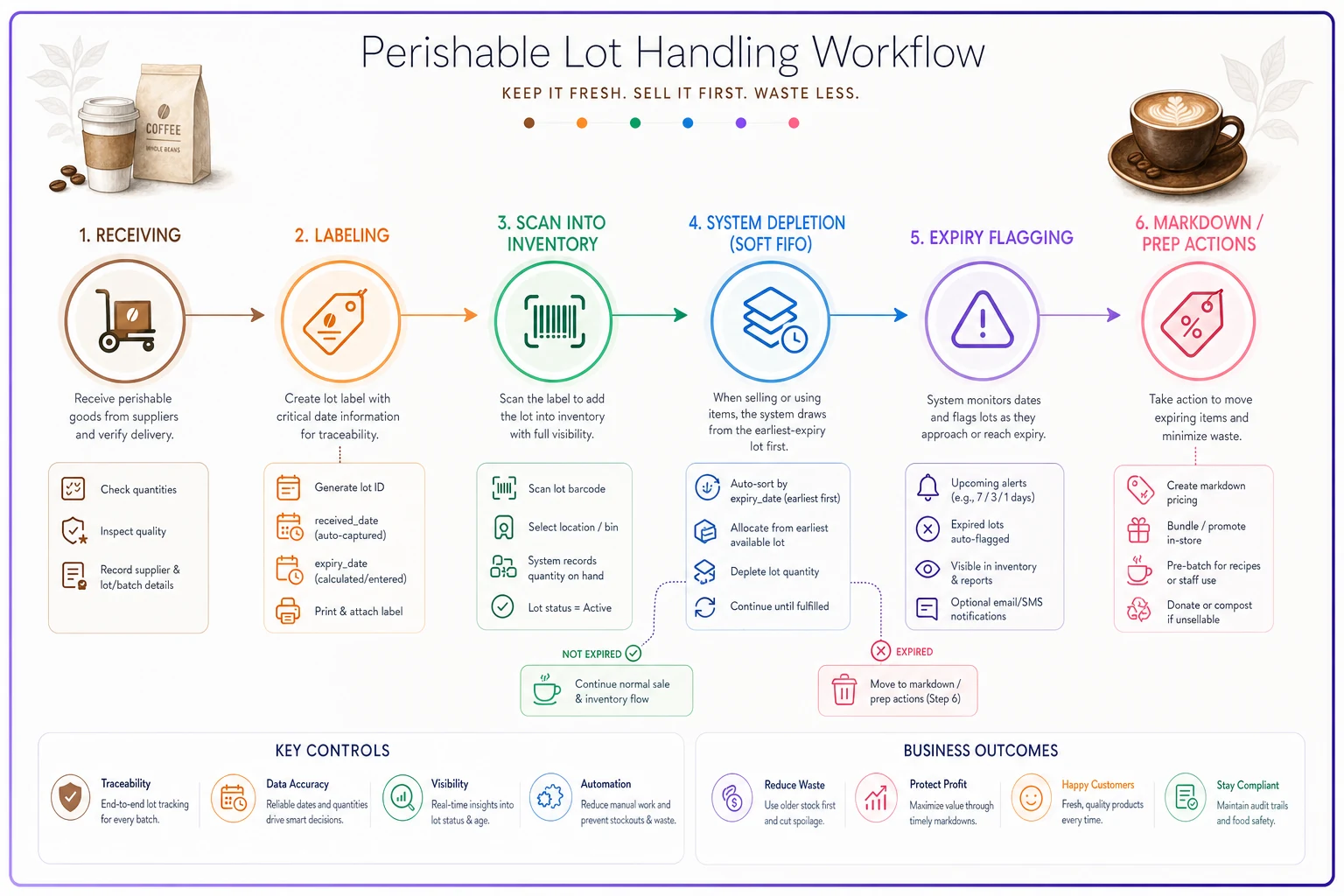
In the system, depletion always draws from the lot with the earliest
expirydatethat still hasquantityremaining > 0. -
Physically, front the oldest lot — standard shelf rotation — so the system's assumption matches reality.
-
On expiry, auto-flag lots crossing a threshold (say, 2 days out) so they surface on a waste/markdown list before they become trash.
The operational pattern that separates clean cafes from leaky ones: the expiry flag should feed your markdown and prep decisions, not just your waste log. A carton 2 days from expiry should trigger "use this in iced batch prep today," not "throw it out tomorrow." The data model makes that visible; the SOP acts on it.
A compact workflow for lot handling:
When lot tracking is worth it — and when it isn't
Not every ingredient deserves lot tracking. Over-tracking is its own failure mode — baristas stop scanning, data goes stale, and the whole thing collapses.
-
Track lots fresh milk, cream, prepped syrups, pastries, deli/sandwich components, anything with a shelf life under roughly two weeks or a HACCP obligation.
-
Skip lots, track quantity only dry goods, cups, lids, long-shelf-life syrups, canned items. These just need on-hand counts and reorder points.
The reorder logic for both still leans on sane par levels. If your pars are guesses, lot tracking just tells you precisely how you ran out — which isn't much comfort. Getting those numbers right first is covered in how to calculate perishable par levels and reorder points for cafés.
Real-time vs. batch sync: a decision tree
Every inventory tool you onboard has to answer one question: when does stock data move between systems? Real-time sounds better and is often wrong — it's more expensive, more fragile, and overkill for most ingredients. Batch is cheaper and more resilient but introduces lag. The right answer is almost always mixed, decided per data flow, not globally.
Work through this per flow:
-
Does a stale number cause a customer-facing failure within one service? If yes — selling an item you're out of on mobile order-ahead, for example — lean real-time or near-real-time.
-
Is the data high-velocity during service? Depletion from sales is high-velocity but tolerant of short lag. Receiving is low-frequency. High-velocity + customer-facing = real-time; otherwise batch.
-
What's the cost of being wrong for an hour? A dairy count being an hour stale is fine. An 86'd mobile order item being an hour stale means refunds and bad reviews.
-
Is the downstream system reliable enough to handle constant writes? Flaky integration + real-time = constant reconciliation errors. When in doubt, batch and reconcile.
A practical default split for most single-site cafes:
| Data flow | Recommended sync | Reasoning |
|---|---|---|
| Sales → depletion | Near-real-time (micro-batch, 1–5 min) | High volume, moderate urgency |
| Mobile/online availability (86 list) | Real-time | Directly customer-facing |
| Receiving → stock increase | Batch (on receipt / end of delivery) | Low velocity, human-triggered |
| Waste/markdown adjustments | Batch (end of shift) | Not time-critical |
| Supplier catalog / price updates | Batch (daily/weekly) | Changes rarely |
| Multi-site transfers | Near-real-time | Prevents double-allocation |
The common mistake is forcing everything real-time because a vendor sells it as a feature. That's how you end up with a system that falls over during your busiest hour — the exact moment you need it most. Fewer real-time moving parts usually means more resilience, not less.
A real scenario
A two-location cafe doing roughly $55k–$60k a month combined had a recurring problem: oat milk stockouts on weekends at both sites, plus a dairy COGS line running around 11–13% when the owner expected closer to 8%.
Two root causes, both in the data model. First, the "oat milk" modifier was additive-only — it added oat milk to depletion but never removed whole milk, so whole-milk counts were permanently inflated and nobody reordered oat milk based on real usage. Second, there was no lot tracking on milk at all, so FIFO was pure habit, and spoilage waste was invisible until the nightly dairy toss.
The fix was unglamorous: rebuild the milk substitution group so modifiers swapped instead of stacked, add lightweight lot tracking (received date + expiry, captured at delivery), and set depletion to draw from the earliest-expiry lot. Availability for mobile orders moved to real-time; receiving stayed batch.
Over the following two months, dairy COGS settled around 8.5–9%, weekend oat-milk stockouts dropped to roughly one incident total instead of near-weekly, and spoilage waste on milk fell by something like a third. No new equipment, no new staff — just a data model that finally matched how the cafe actually ran.
Deliverables
Canonical SKU template (copy this)
--- INGREDIENT --- ingredientid: ING-__ displayname: stockunit: purchaseunit: purchasetostockfactor: isperishable: true/false defaultshelflifedays: tracklots: true/false parlevel: reorderpoint: primarysupplierid: SUP- category: --- MENU ITEM --- menuitemid: MENU-_ posname: baserecipeid: REC-_ sellable: true/false channelflags: [in-store, mobile, catering] --- RECIPE LINE --- recipeid: REC-__ ingredientid: ING-_ quantity: unit: issubstitutable: true/false substitution_group:
Mapping recipes (reference patterns)
-
- Additive
modifier → + quantity ingredient -
- Substitution
modifier → within group X, remove default, add alternative at same quantity -
- Scaling
size → multiply flagged recipe lines by factor -
- Rule of thumb every modifier must add, remove, swap, or scale — name which.
Sync-decision checklist
-
- [ ] Does stale data cause a customer-facing failure within one service? → real-time
-
- [ ] Is the flow high-velocity during service? → near-real-time / micro-batch
-
- [ ] Is it human-triggered and low-frequency (receiving, catalog)? → batch
-
- [ ] Is the downstream integration flaky? → batch + scheduled reconciliation
-
- [ ] Have you defined a reconciliation window for every batch flow?
-
- [ ] Is there a fallback when the sync fails mid-service?
Sample acceptance tests for onboarding an inventory tool
-
Substitution test Sell one oat-milk latte. Confirm whole milk depletion is 0 and oat milk depletion equals the recipe quantity. (Catches additive-only mapping.)
-
Unit conversion test Receive one case of oat milk (12x1L). Confirm on-hand increases by exactly 12,000 ml, not 12.
-
FIFO test Create two lots, expiry 3 days apart. Sell one item. Confirm depletion drew from the earlier-expiry lot.
-
Expiry flag test Set a lot to expire in 2 days. Confirm it surfaces on the markdown/waste list automatically.
-
Modifier stacking test Sell a 16oz oat-milk latte with an extra shot. Confirm milk scaled correctly, milk swapped correctly, and espresso reflects base + extra.
-
Sync lag test 86 an item on mobile. Confirm availability updates within your defined real-time window.
-
Reconciliation test Run a batch flow, intentionally skip one entry, and confirm the reconciliation report catches the discrepancy.
Run these before trusting any new tool with your data. Each should pass cleanly.
Where this leaves you
A perishable-first cafe lives or dies on whether the data underneath its counts actually reflects what's on the shelf and what's about to spoil. The menu items you sell and the ingredients you buy are two different languages, and your master-data spec is the translator. Get the field list stable, map modifiers honestly, enforce FIFO in both the system and the physical rotation, and choose sync timing per flow instead of going all-or-nothing.
None of this requires fancy software — a disciplined spreadsheet can carry a single site surprisingly far. What it requires is deciding the rules before you load products, and then treating the IDs as sacred while letting everything else stay flexible. The cafes that do this spend their time acting on good numbers. The ones that don't spend their time arguing with bad ones.
If you set your master data right, the rest is maintenance. If you don't, every report is arguing with reality.
Ready to brew operational excellence?
Join hundreds of coffee shops using Coffehq to boost efficiency, reduce waste, and elevate customer satisfaction.