

Most cafes don't have a data problem until the day two systems disagree about the same thing. Your POS says you sold 47 oat lattes. Your inventory tool says you have enough oat milk left for 200 more. Accounting shows a revenue number that's off by a couple hundred bucks, and nobody can explain it. Everything "works" — until it quietly doesn't.
The reason this happens isn't that your tools are bad. It's that nobody ever decided which system is the source of truth for each piece of information, and nobody wrote down who owns the fields when they break. That's the whole game. Not fancy integrations — ownership and a shared definition of what a "product" or a "modifier" actually is across every system that touches it.
This is a systems article, not a tips list. It's about how the pieces of a small cafe — POS, inventory, scheduling, accounting, loyalty — talk to each other, where those conversations break down, and what a resilient data architecture looks like when you're running one shop or scaling to five.
Why cafe data breaks — and why it gets worse the moment you add a second site
At a single location, you can survive on tribal knowledge. The owner knows that "LG Latte" in the POS is the same thing as "Latte 16oz" in the inventory sheet, even though they're spelled differently and mapped to different recipes. It works because one brain holds the whole map.
That brain doesn't scale. The moment you add a second location, a new manager, or a loyalty integration, the informal map falls apart. Two sites build their menus independently in the same POS. Site A calls it "Cold Brew 12oz." Site B calls it "CB Small." Now your consolidated sales report can't tell you how much cold brew the business sold — because to the software, they're two different products.
A few concrete failure points that show up again and again:
-
Modifier drift. One store charges $0.75 for an extra shot, another charges $0.80, and a third bundles it into a "double" SKU. Your COGS math on espresso is now garbage.
-
Ghost SKUs. A seasonal drink gets created, used for three months, then abandoned but never archived. Six months later it's still polluting your product list and your reports.
-
Silent sync failures. The inventory integration stops pushing updates on a Tuesday. Nobody notices until Friday when you run out of a base ingredient mid-rush.
-
Tax and category mismatches. A pastry gets tagged as taxable in one system and non-taxable in another, and your accountant finds it at year-end.
None of these are dramatic on their own. They're slow leaks. And slow leaks compound — the longer you run without a clear data model, the more expensive the cleanup gets.
The operator-first data model: keep it minimal, keep it canonical
When people hear "data architecture" the instinct is to over-build. You do not need a 60-field product schema for a cafe. You need a canonical set of fields — one agreed definition of each thing — that every system maps back to.
Keep every order and shift perfectly aligned.
Coffehq helps you manage orders, inventory, and staff schedules seamlessly.
- Unified order processing
- Real-time inventory updates
- Staff shift coordination
No credit card required
The word that matters here is canonical. There should be exactly one official version of each product, each modifier, each ingredient. Every other system references that version instead of inventing its own.
Here's a minimal canonical field list that covers the vast majority of small and multi-site cafes:
Products (menu items sold)
| Field | Why it exists | Owned by |
|---|---|---|
canonical_id | Stable internal ID that never changes, even if the name does | Ops lead |
display_name | Customer-facing name (identical across all sites) | Ops lead |
category | Drink / food / retail / other — drives reporting and tax | Ops lead |
size | Standardized (S/M/L or 12/16/20oz) — never free-text | Ops lead |
base_price | Default price before local overrides | Owner / finance |
tax_class | One value, applied consistently everywhere | Finance |
recipe_link | Points to the ingredient recipe for COGS | Inventory owner |
active_status | Active / seasonal / archived — kills ghost SKUs | Ops lead |
Modifiers
| Field | Why it exists | Owned by |
|---|---|---|
modifier_id | Stable ID for "extra shot," "oat milk," etc. | Ops lead |
modifier_name | Standardized name | Ops lead |
price_delta | Up-charge amount, one value per modifier | Owner / finance |
ingredient_impact | What it draws from inventory | Inventory owner |
Ingredients / inventory items
| Field | Why it exists | Owned by |
|---|---|---|
ingredient_id | Stable ID | Inventory owner |
unitofmeasure | oz / g / each — must match purchasing units | Inventory owner |
supplier_link | Ties to purchasing | Inventory owner |
par_level | Reorder trigger per site | Site manager |
The point of keeping this list short is that a small team can actually maintain it. If a field doesn't drive a decision — pricing, ordering, tax, or reporting — it doesn't belong in the canonical model. Every extra field is something someone has to keep accurate forever.
One thing that saves people a lot of pain: the canonical_id should never be the product name. Names change. "Pumpkin Spice Latte" becomes "PSL" becomes "Fall Latte." If your systems are joined on the name, every rename breaks your historical reporting. Join on a stable ID that customers never see and staff never edit.
Who owns what: a RACI that prevents finger-pointing
Data models rot for a simple reason — when a field is wrong, nobody's clearly responsible for fixing it, so it stays wrong. A simple ownership matrix fixes more sync problems than any integration ever will.
For a cafe, you don't need the full corporate version. You need to know, for each type of change, who does it (Responsible), who signs off (Accountable), who gets consulted, and who just needs to know it happened.
| Data change | Responsible | Accountable | Consulted | Informed |
|---|---|---|---|---|
| Create new menu item | Ops lead | Owner | Finance, Inventory | Site managers |
| Change a price | Site manager (proposes) | Owner | Finance | All staff |
| Archive a SKU | Ops lead | Owner | Finance | Site managers |
| Adjust a recipe / COGS | Inventory owner | Ops lead | Finance | — |
| Change tax class | Finance | Owner | Accountant | Ops lead |
| Fix a sync error | Whoever's on shift (log it) | Ops lead | — | Owner |
| Set/adjust par levels | Site manager | Ops lead | — | — |
A couple things worth calling out. First, only one person should be Accountable for any row. If two people can both approve a price change without talking, you'll get two prices. Second, notice that price changes are proposed by site managers but approved by the owner or finance. That separation is what stops a well-meaning manager from quietly discounting a drink and wrecking your margin — a problem worth reading more about in this menu-engineering and pricing playbook.
The RACI also does something subtle: it makes the fix-a-sync-error row a normal, expected task instead of an emergency. When the person on shift knows they're allowed to log a sync issue and hand it off, problems get caught in hours instead of days.
The phased migration: how to fix a messy setup without closing the shop
Nobody gets to rebuild their data model on a clean Sunday with the lights off. You have to do it while serving customers. That's why it has to be phased — small, reversible steps where you can always roll back to the last good state.
Here's a stepwise plan that works for a single cafe or a small group migrating onto a cleaner model.
-
Freeze and snapshot. Before touching anything, export everything as-is: full product list, modifiers, prices, tax classes, from every system. This is your rollback point. Date it. Don't skip this — it's the one step people regret skipping.
-
Audit and de-duplicate. Pull every product across sites into one spreadsheet. Flag duplicates ("Cold Brew 12oz" vs "CB Small"), orphaned modifiers, and dead SKUs that haven't sold in 90 days. This is usually where owners are shocked — a "50-item menu" often has 180 raw entries once you count variants and abandoned items.
-
Assign canonical IDs. Map every real product to one
canonical_id. Duplicates collapse into a single ID. This becomes your master reference sheet. -
Standardize the small stuff. Fix sizes to one convention. Fix tax classes. Fix modifier names and price deltas. Boring work, big payoff.
-
Migrate one system, verify, then the next. Update the POS first — it's the source of truth for sales. Verify it against your master sheet. Only then push mappings to inventory, then accounting, then loyalty. Never migrate two systems in the same session. You won't know which one caused a problem.
-
Run in parallel for one week. Keep the old reports running alongside the new ones. If the numbers match, you're clean. If they don't, you have a defined window to catch it.
-
Archive, don't delete. Once you're confident, mark old SKUs as archived rather than deleting them. You want the history intact for year-over-year comparisons.
The migration order matters more than most people think. POS goes first because it's where money actually changes hands — if your sales data is wrong, everything downstream inherits the error. This is the same logic behind a solid data-sync and reconciliation process: fix the source before you fix the mirrors.
Here's a simple visual of the phased migration workflow.
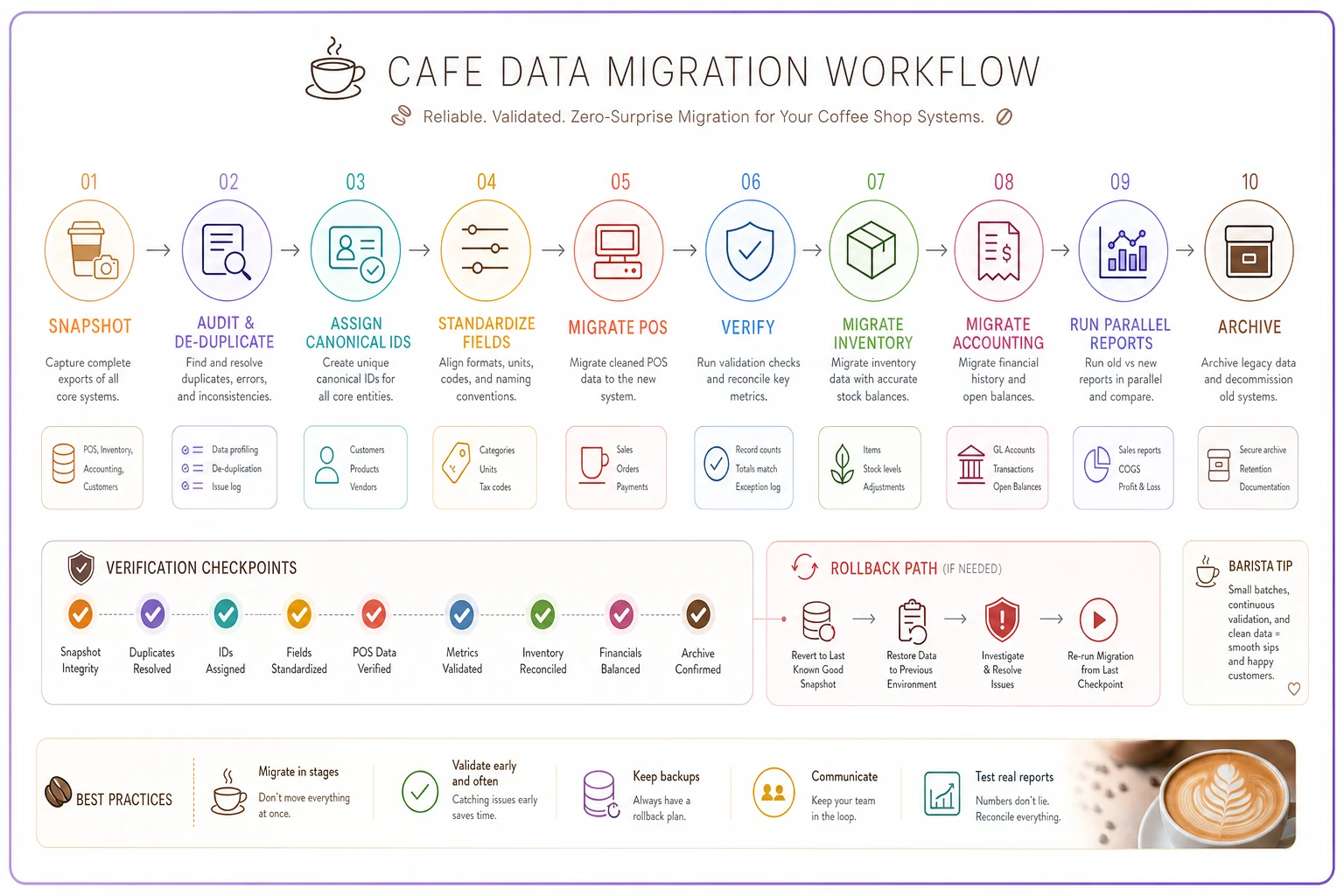
Keep each migration to one system at a time and always run the old and new in parallel for a defined window.
A sync-testing runbook you can actually run on a slow morning
Integrations don't announce when they break. So you test them on purpose, on a schedule, using known values. Push a transaction you fully understand and confirm it shows up correctly everywhere it should.
Here's a lightweight sync-test template a manager can run in about 15 minutes:
Weekly sync test checklist:
-
Ring up one known test item (a $1.00 "TEST" SKU works well) and confirm it appears in the POS sales report.
-
Confirm the sale decremented the linked ingredient in inventory by the exact recipe amount.
-
Confirm the revenue and tax hit the correct accounts in accounting.
-
Confirm a loyalty point (if applicable) posted to a test customer account.
-
Void the test transaction and confirm the reversal flowed to all systems, not just the POS.
-
Check the last successful sync timestamp on each integration — anything older than 24 hours is a red flag.
-
Log the result (pass/fail) with the date and who ran it.
Run the weekly sync test during a predictable slow 15-minute window so it reliably gets done.
That void step is the one people forget, and it's the most important. Plenty of integrations sync sales cleanly but handle refunds and voids poorly — so a void shows up in the POS but never reverses in inventory or accounting. That's how you end up with inventory numbers that slowly drift high and revenue that reconciles wrong at month-end.
A second, deeper test worth running monthly: pick a single high-volume product, pull its unit count from the POS for the month, and multiply by its recipe amounts. Compare that theoretical usage against what inventory says you actually consumed. A small gap is normal — waste, spillage, comps. A large gap means either the recipe mapping is wrong or something isn't syncing.
Pairing these tests with a role-based manager dashboard makes them much easier to sustain — the person on shift sees the sync-status and the test log in the same place they check everything else, so it becomes a habit instead of a special project.
A real scenario: two sites, one very confused report
A small roaster-cafe with two locations couldn't figure out why their consolidated cold-brew numbers never matched what the baristas felt they were making. Sales looked strong at both shops, but the business-level report showed cold brew as a minor category.
The cause was exactly the kind of thing that hides in plain sight. Each site had built its own menu when it opened. Site one used "Cold Brew — 12/16/20." Site two used "Nitro/Cold" as a single bucket with size modifiers. Two different structures, no shared canonical_id. The combined report was averaging apples and oranges.
The fix wasn't dramatic. They snapshotted both menus, collapsed everything to one canonical cold-brew product with standardized sizes, remapped both POS systems, and ran parallel reports for a week. Cleanup took a couple of afternoons spread over two weeks, mostly spent de-duplicating.
The payoff showed up fast. Cold brew turned out to be a top-three category once counted correctly — not a minor one — which changed how they scheduled batch prep and ordered green beans. They also found roughly a dozen ghost SKUs from old seasonal drinks still cluttering the product list, and a modifier price that was set to $0.65 at one shop and $0.85 at the other for the exact same add-on. Small stuff individually. Together it was quietly undermining every decision they made from reports.
When this level of structure is worth it — and when it isn't
When it makes sense: You're running two or more sites, you're about to add one, you use more than two connected systems (POS + inventory + accounting), or you keep finding reports that don't reconcile. The moment more than one person can create or edit products, you need canonical IDs and a RACI. Full stop.
When it's overkill: A single small shop with a 20-item menu, one owner doing everything, and no plans to expand. If one brain still holds the whole map reliably, you can run lighter — a clean product list and a monthly reconciliation is enough. Don't build a five-site architecture for a one-person kiosk.
Who should not attempt a full migration mid-crisis: If you're in your busiest season, short-staffed, or about to launch a big promotion — wait. The snapshot-and-parallel approach is safe, but it still takes real attention. Do it during a slower stretch when you can actually watch the numbers for a week.
The core idea to hold onto
Resilient cafe data architecture isn't about buying better software or wiring up more integrations.
It's about deciding three things and writing them down: what the canonical version of each item is, who owns it when it breaks, and how you test that the systems still agree.
Resilient cafe data architecture isn't about buying better software or wiring up more integrations. It's about deciding three things and writing them down: what the canonical version of each item is, who owns it when it breaks, and how you test that the systems still agree. Get those three right and most of the ugly reconciliation problems — the mystery revenue gaps, the drifting inventory, the reports that never quite match — stop happening on their own. The tools change. The canonical_id, the ownership matrix, and the weekly sync test are what keep the whole thing from quietly falling out of alignment while you're busy making coffee.
Ready to brew operational excellence?
Join hundreds of coffee shops using Coffehq to boost efficiency, reduce waste, and elevate customer satisfaction.