


Most independent cafes don't have a technology strategy. They have a pile of subscriptions that accumulated over five years, half of which nobody remembers signing up for. The espresso machine tech recommended one thing, the accountant recommended another, a former manager set up a loyalty app that's still charging $49 a month, and somewhere in there is a scheduling tool that only one person knows the login for.
That's not a knock on operators. It's just what happens when a business grows by solving one problem at a time. Each tool made sense on the day it was added. Nobody ever governed the whole stack. And when a vendor raises prices, gets acquired, goes down during Saturday rush, or quietly changes their data export format, you find out at the worst possible moment.
Cafe technology governance sounds like something that belongs at a company with an IT department. It isn't. It's a small set of habits and documents that let a non-technical owner stay in control of the tools the business runs on. This piece lays out a system you can actually use — vendor lifecycle stages, the handful of data fields you should record on every tool, copyable SLA and exit checklists, a resilience test pack, and a once-a-year review any manager can run in an afternoon.
Why the stack quietly turns into a liability
A cafe's tech problems almost never show up as "technology problems." They show up as operational ones.
A payment processor changes its settlement timing, and suddenly your cash-on-hand math is off for two weeks before anyone notices. A loyalty vendor migrates platforms and drops half your customer point balances, and now your baristas are arguing with regulars at the register. Your POS pushes an update that changes how modifiers export, and inventory counts start drifting because the sync silently broke.
None of these feel like governance failures in the moment. They feel like bad luck. But they share a root cause: no single place records what each tool does, who owns it, what happens when it fails, and how you'd get your data out. The knowledge lives in people's heads and email threads.
What breaks at scale is coordination. One location with four tools is manageable by memory. Two or three locations running slightly different versions of the same tools — one site still on the old scheduling app, another on the new one, three different payment terminals — becomes ungovernable fast. The reconciliation headaches this creates are their own beast, and we've covered the mechanics of keeping systems talking to each other in the cafe data-sync and reconciliation playbook. Governance is the layer above that: knowing what you have and controlling it before the sync even becomes a question.
The vendor lifecycle: five stages every tool moves through
The core idea behind operator-first governance is that every vendor relationship has a lifecycle, and most cafes only pay attention to the first stage. You evaluate hard when you're buying, then go quiet for years, then panic when you need to leave.
Keep every order and shift perfectly aligned.
Coffehq helps you manage orders, inventory, and staff schedules seamlessly.
- Unified order processing
- Real-time inventory updates
- Staff shift coordination
No credit card required
| Stage | What it looks like | The mistake most operators make |
|---|---|---|
| 1. Evaluate | You're comparing options, doing a trial | Judging on features and price only, ignoring exit terms |
| 2. Onboard | Setting up, importing data, training staff | Not recording logins, contract dates, or data ownership |
| 3. Operate | Daily use, the "invisible" years | Never re-checking price, performance, or whether you still need it |
| 4. Review | Deliberate annual look at the tool | Skipping it entirely until something breaks |
| 5. Exit | Switching or canceling | Discovering too late that data is trapped or auto-renewal already hit |
The two stages that get skipped — Review and Exit planning — are exactly the ones that cost the most when ignored. A vendor that would've been easy to leave in year one becomes a hostage situation by year three because you've got two years of loyalty history, customer contacts, and sales data living only inside their system.
The fix isn't to become paranoid about every tool. Record a few things at onboarding, revisit them once a year. That's really it.
The minimal immutable data fields (record these once, per tool)
"Immutable" here just means facts about the vendor relationship that don't change often and should be written down somewhere that isn't a person's memory. Keep it in a single shared spreadsheet or doc. The goal is that any owner or manager can open it and understand every tool the business depends on.
For each vendor, record:
-
Tool name and what it actually does — in plain language, not the marketing category ("takes card payments and settles next day," not "omnichannel payments platform")
-
Owner — the one person responsible for this relationship
-
Login location — where credentials are stored (a password manager, ideally — never a sticky note or shared email)
-
Monthly/annual cost — and the billing date
-
Contract renewal date — and whether it auto-renews
-
Notice period to cancel — 30 days? 60? This is the field everyone forgets
-
Data ownership — can you export your data, in what format, and does it cost anything?
-
Criticality — can the cafe operate for a day without it? An hour?
-
Backup / manual fallback — what you do if it's down (more on this below)
Put the spreadsheet in a shared doc or password-protected drive so any manager can open it during a shift.
Nine fields. Most cafes can fill this out for their entire stack in under an hour, and the act of doing it usually surfaces at least one surprise — a tool nobody's using, a renewal date that's next week, or a login only the departed manager had.
The notice period and data ownership fields deserve extra attention because they're the ones that turn a routine switch into an expensive mess. A processor with a 90-day cancellation notice and no clean export path can trap you for a full quarter after you've already decided to leave.
SLA basics without the enterprise theater
Service Level Agreements at a cafe scale don't need to be legal documents. You're not negotiating a Fortune 500 contract. But you should know — and write down — what each vendor actually promises when things go wrong, and what you'll do if they don't deliver.
SLA checklist — critical vendors
-
[ ] What's their promised uptime? (Anything below 99.9% for a payment tool is worth questioning)
-
[ ] How do I report an outage — phone, chat, email? What are the hours?
-
[ ] What's their typical response time for a "we're down" ticket?
-
[ ] Is there phone support during my peak hours, or only email that replies next business day?
-
[ ] What happens to in-flight transactions if their system fails mid-payment?
-
[ ] Do they notify me proactively about planned maintenance or updates?
-
[ ] Is there any credit or refund if they're down for an extended period?
The last question rarely matters financially — a $12 credit doesn't cover a lost Saturday. But asking it during evaluation tells you how seriously the vendor takes their own reliability. A vendor that stumbles through the "what happens during an outage" questions is telling you something.
The practical move here is matching support hours to your busy hours. A tool with brilliant support that's only available 9-to-5 on weekdays is useless when your problems happen at 8am Saturday. Plenty of operators figure this out exactly once, mid-rush, staring at a support queue that opens Monday.
The exit checklist: plan the divorce before the wedding
The single most under-appreciated governance move is deciding, at onboarding, how you'd leave a vendor. Not because you're planning to — but because knowing you can leave changes the whole relationship. Vendors treat customers who can walk away differently from customers who are trapped.
Exit readiness checklist
-
[ ] Can I export all my data myself, without calling support?
-
[ ] What format does it come in — usable (CSV, standard files) or proprietary junk?
-
[ ] Does exporting cost anything?
-
[ ] How long does the vendor keep my data after I cancel, and can I get a final pull?
-
[ ] What's the exact cancellation process and notice period?
-
[ ] Will canceling break anything connected to it? (A loyalty tool tied into the POS, for example)
-
[ ] Do I have a replacement path in mind, even loosely?
-
[ ] Are staff logins and admin access things I control, or does the vendor?
The nightmare scenario looks like this: a cafe wants to switch loyalty providers. Two years of customer visit history and point balances live only in the old vendor's system. There's no self-serve export. Support says they can provide a "data file" for a fee, but it arrives in a format the new vendor can't import. So the cafe either eats the cost of losing all that history or stays put and keeps paying. That entire trap was avoidable with one question asked at signup.
An outage and resilience acceptance test pack
Governance isn't only about contracts and data — it's about knowing your stack actually holds up when a piece fails. Rather than hoping, you can test it, deliberately, during a slow period. Think of it as a fire drill for your tech stack. The broader thinking on staying open through disruptions is worth reading alongside this in the technology resilience blueprint for cafes.
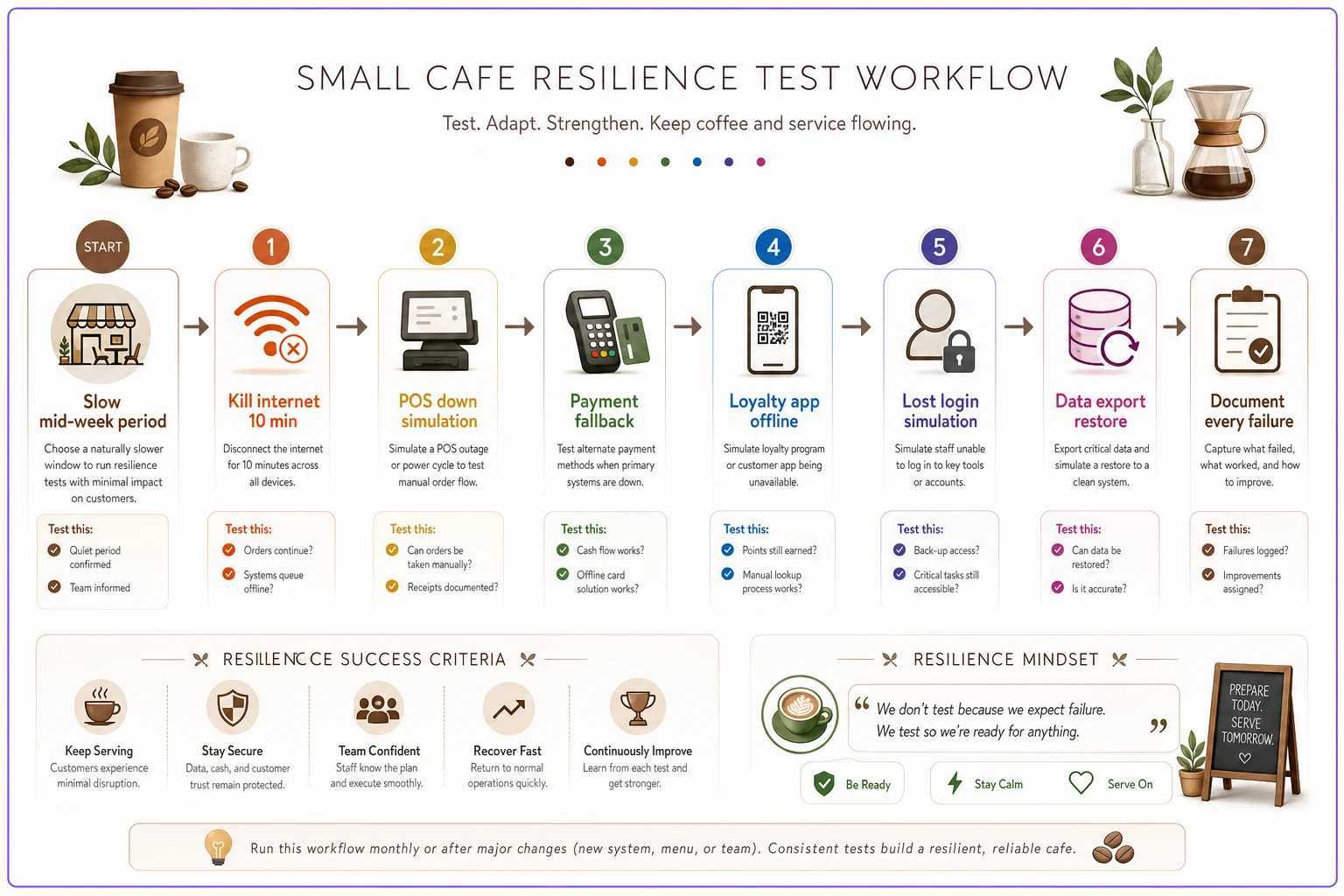
RESILIENCE TEST FLOW [Start: Slow mid-week period] | v [Test 1: Kill internet 10 min] --> Does offline card mode actually work? | v [Test 2: POS down simulation] --> Can staff take paper orders and recover? | v [Test 3: Payment fallback] --> Is backup reader charged and paired? | v [Test 4: Loyalty app offline] --> Do baristas have a clear policy or do they guess? | v [Test 5: Lost login simulation] --> Can anyone else get in without Dave? | v [Test 6: Data export restore] --> Open the export. Does it actually make sense? | v [Document every failure] --> Each gap gets fixed on your schedule, not during a crisis
Here's a simple visual of that test flow.
-
Kill the internet for ten minutes. Can you still take card payments? Many terminals have an offline mode, but you need to know it works and know the transaction limit. Watch what actually happens — don't assume.
-
Pretend the POS is down. Can staff take orders on paper and ring them in later? Is there a written fallback, or does everyone freeze? Time how long it takes to recover.
-
Test the payment fallback. If the primary processor is unreachable, do you have a backup way to charge — a mobile reader, a secondary terminal? Confirm it's charged and paired.
-
Break the loyalty lookup. If the loyalty app won't load, what do baristas tell customers? Is there a policy, or does it become a different argument at the register every time?
-
Simulate a lost login. Pick a critical tool and check
could someone other than the usual owner get in during an emergency? If the answer is "only Dave knows the password," that's a finding worth fixing today.
-
Restore from a data pull. Actually export your data from one tool and confirm it opens and makes sense. A backup you've never tested isn't really a backup.
Write down what fails. Each failure is a gap you get to close on your own schedule instead of during a crisis. The underlying architecture matters here too — how your tools are wired together determines what survives a partial failure. The design principles behind that are covered in small-cafe data architecture for resilient POS integrations, and they pair naturally with running these tests.
A cafe that runs this pack a couple times a year handles real outages much more calmly. Staff have literally rehearsed it. That makes a real difference when it's not a drill.
The annual lightweight vendor review (no IT required)
Once a year, block ninety minutes. Pull up your data-fields spreadsheet. Go tool by tool and ask five questions.
-
Do we still use this, and does it still earn its keep? Cancel anything nobody can defend. Cafes routinely find two or three zombie subscriptions this way.
-
Has the price crept up? Compare today's cost to last year's. Renewal creep is real — a tool that was $29 quietly becomes $59.
-
Did it fail us this year, and how did the vendor handle it? Repeated outages with slow support are a signal to start planning an exit.
-
Is our data still exportable, and are the login/owner fields current? Update the spreadsheet. Fix any "only one person knows this" situations.
-
Is there a better or cheaper option now? You don't have to switch. But knowing your alternatives keeps you from feeling trapped and gives you leverage at renewal.
The reason this works without IT is that none of it requires technical skill. It requires ownership and an afternoon. The hardest part is having recorded the basics in the first place — which is why the data-fields step matters so much. The review is just reading what you wrote down and acting on it.
A real scenario
A two-location cafe had grown to eleven active software subscriptions without anyone ever mapping them. Two were duplicates — a leftover scheduling tool from before they standardized, running around $40 a month at one site that nobody had bothered to cancel. One loyalty app was still billing roughly $55 monthly for a program they'd stopped promoting a year earlier.
They ran their first governance pass in an afternoon: filled out the nine data fields for every tool, checked renewal dates, and ran the outage test pack. The review surfaced the zombie subscriptions immediately — close to $1,100 a year, gone with two cancellation emails. More importantly, they found their payment processor had a 60-day cancellation notice they'd never known about, and their loyalty data had no self-serve export at all.
The direct savings were real but modest. The bigger win came three months later when the POS vendor pushed a botched update and the register went down mid-morning. Staff pulled out the paper fallback they'd rehearsed, kept serving, and rang everything in after. No lost sales, no panic. Before the governance pass, that same outage would've meant a closed register and a line to the door.
When this makes sense — and when it's overkill
This full framework is worth doing once you're running more than five or six tools, or more than one location. At that point the complexity is real and the coordination costs are already hurting you, whether you've named them or not.
For a single small cafe with a POS, a payment processor, and one scheduling app, you don't need a formal lifecycle model. But you should still do the two cheapest, highest-value moves: write down the nine data fields once, and ask the exit questions before adding any new tool that holds your data. Those two habits alone prevent most of the traps.
Where it becomes counterproductive is if governance turns into bureaucracy — endless documentation nobody reads, reviews that eat a full day, a spreadsheet with forty columns. The whole point is lightweight. If your review takes more than a couple hours a year, you've overbuilt it. Nine fields, five review questions, one test pack. Keep it that small and you'll actually keep doing it.
The real shift
Operator-first technology governance isn't about tools. It's about staying the person in charge of your own business as it grows more complex. The cafes that get blindsided by tech failures aren't unlucky — they just never wrote anything down, never tested a fallback, and never planned an exit before needing one.
You don't need to be technical. You need to know what you're running, who owns it, what breaks when it fails, and how you'd walk away if you had to. Record those facts once, review them once a year, and test them before they get tested for you. That's the entire game.
You don't need to be technical. You need to know what you're running, who owns it, what breaks when it fails, and how you'd walk away if you had to. Record those facts once, review them once a year, and test them before they get tested for you. That's the entire game.
Ready to brew operational excellence?
Join hundreds of coffee shops using Coffehq to boost efficiency, reduce waste, and elevate customer satisfaction.