

Every cafe owner has a version of this memory: a Saturday morning, line out the door, and the card reader just spins before flashing a decline that isn't really a decline. The internet's down. Or the POS is stuck. Or the payment processor is having "a moment." The whole floor grinds to a halt while a 19-year-old barista stares at you like you're supposed to have a plan.
Most don't. Not because owners are careless — it's because resilience gets treated as an IT problem, and small cafes don't have IT. What they have is a manager, a couple of tablets, a payment terminal, and a handful of vendor logins nobody remembers the passwords to.
The good news is that cafe POS resilience has almost nothing to do with technical skill. It's an operations discipline. A set of small procedures your team can actually run under pressure, plus a few decisions you make once and never revisit. This covers the whole system — how it breaks, and how to make it fail gracefully instead of catastrophically.
Why outages hurt cafes more than other small businesses
A cafe runs on speed and small tickets. That combination is uniquely fragile.
Think about the math. If your average ticket is around $7–$9 and you're pushing 40–60 transactions in a peak hour, ten minutes of dead terminal isn't a minor inconvenience — it's a line that dissolves because people won't wait for a $4 latte. They walk. And unlike a restaurant with a captured table, your customer has zero switching cost. The coffee shop across the street exists.
There's also a coordination problem baked into how cafes are staffed. During peak, everyone is heads-down on their station. Nobody is watching dashboards. Nobody notices that card payments have been silently failing for eight minutes until three customers in a row get declined. The failure isn't the outage itself — it's how long it takes anyone to realize there's an outage.
The real damage usually isn't the ten-minute network blip. It's the compounding mess afterward: tickets taken on paper and never rung in, tips that didn't get recorded, a settlement batch that didn't close, inventory now out of sync because half the morning never hit the system. One outage creates a week of reconciliation headaches. If you've dealt with that cleanup, our cafe data-sync and reconciliation playbook covers the aftermath in more depth.
Resilience is really about containing that blast radius.
The five things that actually break
Before building procedures, it helps to be honest about what fails. In real cafe operations, outages cluster into five categories, and they don't all get fixed the same way.
Keep every order and shift perfectly aligned.
Coffehq helps you manage orders, inventory, and staff schedules seamlessly.
- Unified order processing
- Real-time inventory updates
- Staff shift coordination
No credit card required
| Failure point | What it looks like on the floor | Who can fix it | Typical duration |
|---|---|---|---|
| Internet / connectivity | POS slow or frozen, card reader won't connect | You (failover) | Minutes to hours |
| Payment processor | Cards decline in waves, terminal errors | Vendor only | Unpredictable |
| POS software / cloud | App won't load, menu won't pull up | Vendor only | Minutes to hours |
| Hardware | Reader dies, printer jams, tablet won't wake | You (spare) | Instant if prepared |
| Power | Everything's dark | Utility / you | Hours |
The important insight: two of these you can fix yourself, and three you can only survive. Most owners waste energy trying to "fix" a processor outage that's completely out of their hands, when the actual job is to keep taking money while the vendor sorts it out. Sorting failures into "fix" vs. "survive" is the first mental shift worth making.
Vet your vendors before you trust them — with a real acceptance test
A mistake that's almost universal: cafes choose a POS and payment processor based on transaction fees and how the sales rep made them feel, then discover the reliability story only during an outage. By then it's too late.
-
Does the POS work offline at all, and what exactly still functions? Some let you take cash and queue card payments. Some brick completely without internet. This is the single most important question and reps often dodge it.
-
How are queued offline transactions settled later, and what's the failure rate? Ask specifically: what happens if a queued card declines when connectivity returns?
-
What's the documented support response time during an outage — and is there a real phone number, not just a ticket form?
-
Can you export your sales and inventory data yourself, on demand, without asking them? If the answer is no, you don't own your data.
-
Do they publish a status page? No status page usually means no operational maturity.
Then actually test it. On a slow afternoon, put the terminal in airplane mode and try to ring a sale. Unplug the router for two minutes. Watch what breaks. Better to discover the failure mode on a Tuesday at 2pm than during Saturday rush. This kind of vendor scrutiny pairs well with the thinking in our small-cafe data architecture for resilient POS integrations post, which digs into how the pieces should connect underneath.
Payment failover: the one decision that keeps money moving
If cards stop working and you have no backup, you're effectively closed even though the lights are on. Payment failover is the difference between "we're cash-only for twenty minutes, sorry for the wait" and "we can't serve you."
A cafe's failover doesn't need to be sophisticated. It needs to exist, be reachable, and be something your closing shift can operate without thinking.
The practical setup looks like a small ladder:
-
Primary POS + integrated card reader. Normal operations.
-
Secondary reader on a different network path. A simple mobile card reader (the tap-to-phone kind) tethered to a manager's phone with cellular data. Different processor if possible — so a processor-wide outage doesn't take out both. This is the workhorse of failover.
-
Manual cash. Always. A working float, a way to make change, and a manual method to record what was sold.
-
Deferred payment / tab for regulars only, small amounts, written down, reconciled same day.
The mistake people make is buying the backup reader, leaving it in a drawer, and never charging it. A dead backup is worse than no backup because it creates false confidence. Whoever opens should confirm the backup device is charged and the float is counted — same as checking the milk levels.
One more thing that quietly matters: know your settlement checks. Every day, someone should confirm that yesterday's batch actually settled and deposited. Outages have a nasty habit of leaving transactions in limbo — authorized but never captured. If nobody's checking the deposit against the sales total, you can lose real money and not notice for weeks.
Minimal monitoring: how to notice a problem in 60 seconds, not 8 minutes
Enterprises have monitoring dashboards and on-call engineers. You have a busy counter. The goal isn't sophisticated monitoring — it's cutting the detection time, because that's where the money leaks.
-
The two-decline rule. Any barista who sees two card declines in a row on different cards immediately tells the shift lead. Two declines in quick succession is almost never two bad cards — it's the system. This one rule shrinks detection time more than any tool.
-
Status page bookmarks. Bookmark your POS and processor status pages on the counter tablet. When something feels off, that's the first tap. Thirty seconds tells you if it's you or them.
-
A daily settlement alert. Most modern POS and payment platforms can email or text the daily deposit summary. If it doesn't arrive, that's a signal. If the number looks wrong, that's a bigger one.
-
Connectivity check on open. Part of the opening routine
load the POS, run a $0.01 test transaction (voided immediately), confirm the printer fires. Three minutes, catches most overnight issues before the first customer walks in.
Keep the status page bookmarks on the counter tablet so anyone can check them in under 30 seconds.
Worth internalizing: your fastest monitoring tool is a trained staff member who knows what "wrong" looks like and is allowed to interrupt. Software alerts are a backstop, not the front line.
Offline-sale procedures your team can run under pressure
This is where most resilience plans fall apart. The plan exists in the owner's head, or in a laminated sheet nobody's read since orientation. When the moment comes, the staff on register freezes.
An offline procedure has to be dead simple and physically present. Here's a workable one:
When the system goes down mid-rush:
-
Shift lead announces it. "We're on manual for a few minutes — cash and mobile reader only." Say it to the team and the line. Managing the line is half the battle.
-
Switch to the backup reader for card payments. If that's down too, cash only.
-
Log every sale on the manual pad. Item, price, payment type. One line per ticket. Non-negotiable — it's how you rebuild the record.
-
Keep drinks moving. Don't stop making coffee while fighting the terminal. Product out the door is the whole point.
-
When the system returns, the shift lead re-enters the manual tickets or reconciles the count before the batch closes.
Keep the manual pad, a pen, a printed price list, and the backup reader together in one labeled spot. Not scattered. The single most common offline failure isn't the outage itself — it's that nobody could find the pen and the price list at the same time.
There's a coordination angle here too. If you're running mobile and in-store orders together, an outage scrambles the queue badly, and pickup chaos compounds fast. The queue discipline in our queue rules and staff roles for mixed order channels piece holds up during outages precisely because it doesn't depend on the screen being right.
A rapid recovery runbook (for the manager, not the engineer)
When something breaks, the manager needs a decision path, not a debugging session. The runbook's job is to answer one question fast: is this ours to fix, or ours to survive?
Here's the flow, in plain language:
Step one — isolate. Is it just the card reader, or everything? Try a second device. If one tablet works and one doesn't, it's hardware — swap it, done. If everything's frozen, keep going.
Step two — check the status pages. POS status page and processor status page. If either shows an incident, it's a vendor outage. You now know it's a survive situation — go to offline procedures, and stop trying to fix it. This step alone saves managers from an hour of pointless router-restarting.
Step three — try the connectivity fixes you control. Restart the router (know where it is). Switch the terminal to cellular/hotspot backup if you have it. If that restores service, it was an internet problem, not a vendor one.
Step four — escalate to the vendor with your specific info: what's failing, what you've tried, your merchant ID ready. A prepared call gets faster help than a panicked one.
Step five — reconcile after. Once you're back, close the loop: enter manual tickets, confirm the batch settled, check inventory didn't drift. Recovery isn't done when the system's back — it's done when the books are clean.
Print this as a one-page sheet. Tape it inside the register cabinet. Managers should be able to run it without calling you. Equipment-driven failures deserve their own version of this thinking, which is why our preventive-maintenance and downtime recovery playbook is worth pairing with this one.
Below is what that decision flow looks like end-to-end, from the moment something feels wrong to the moment the books are clean:
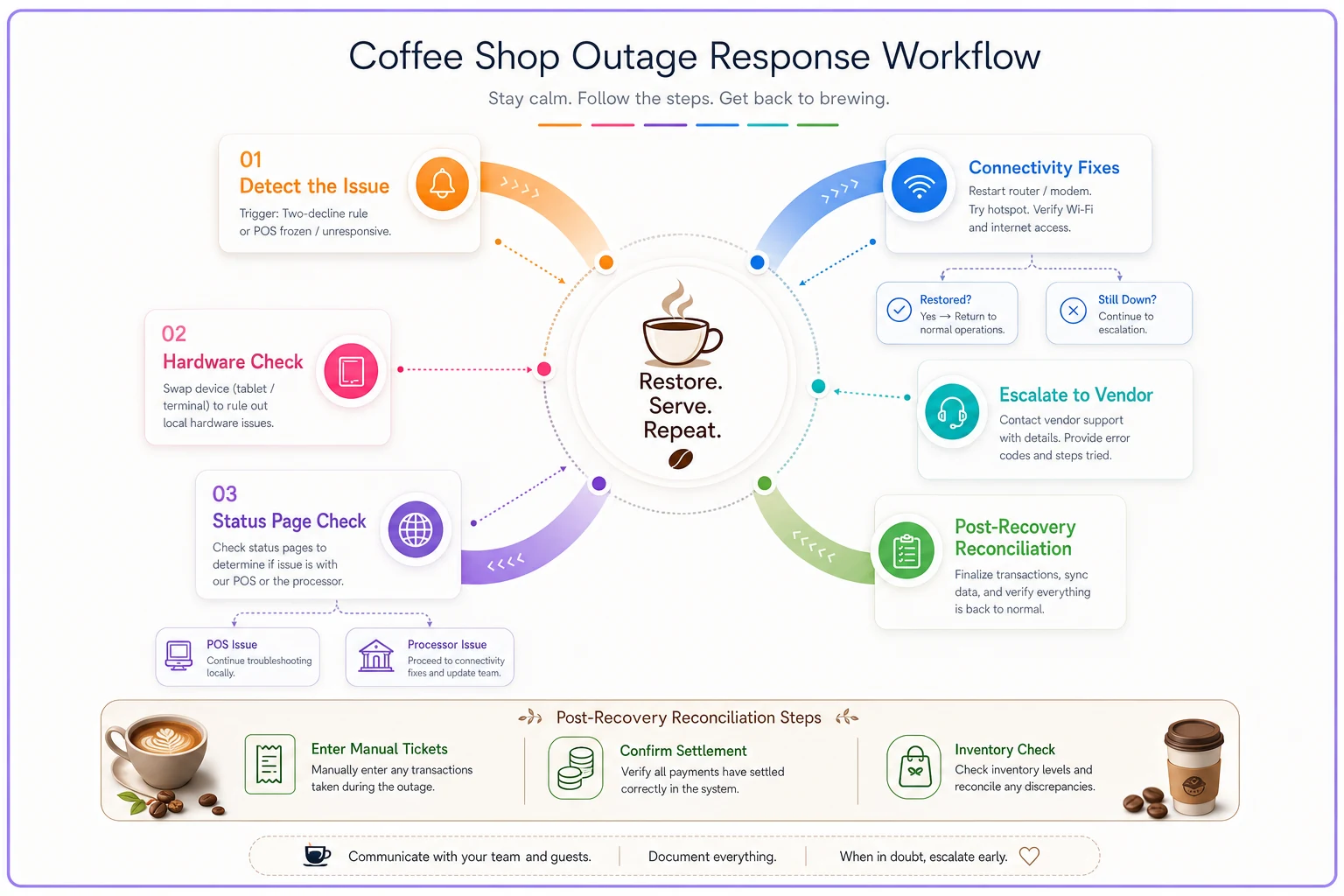
A simple visual like this helps a manager run the flow without hunting for the sheet.
A real scenario: the neighborhood cafe that stopped losing rush revenue
A single-location cafe doing roughly $28k–$32k a month had a recurring problem: their processor had intermittent outages that seemed to hit, of all times, weekend mornings. Each event ran maybe 15–25 minutes. During those windows they'd go effectively card-closed, and since most tickets were card, the line evaporated.
They estimated losing somewhere around $150–$250 per incident in walked customers, plus the reconciliation mess afterward. Over a few months that added up to real money, and the owner was ready to switch processors entirely — an expensive, disruptive move.
What actually fixed it was cheaper. They added a tap-to-phone backup reader on a different processor tied to the manager's phone (about $30 in hardware plus per-transaction fees only when used). They wrote the five-step offline procedure on an index card and taped it by the register. They added the two-decline rule to opening training. And they started checking daily settlement against sales.
The next outage, the shift lead called "manual" within about a minute, switched to the backup reader, and kept the line moving. Estimated loss that morning: close to zero. They also caught two unsettled batches over the following weeks that would've quietly cost them a few hundred dollars. They never did switch processors.
The lesson wasn't about the specific gadget. A fast detection rule plus a rehearsed procedure beat an expensive vendor migration every time.
When to invest more — and when you're overthinking it
Not every cafe needs the same level of resilience, and there's a real cost to over-engineering this.
This full setup makes sense when: you're card-heavy (most cafes now), your peak revenue is concentrated in tight windows, or you've already lost real money to an outage. If a 20-minute failure meaningfully hurts your day, invest in failover and rehearsed procedures.
You can keep it lighter when: you're low-volume, cash still moves easily among your customers, or your tickets are large enough that people will wait. A quiet neighborhood spot doing 15 transactions an hour survives an outage on cash and patience.
Where cafes over-invest: buying redundant everything — multiple internet lines, enterprise-grade UPS systems for a two-tablet shop. That's solving an enterprise problem you don't have. The backup reader, the index card, and the two-decline rule cover the vast majority of your real risk for under a hundred bucks. Start there.
Who should absolutely not skip this: anyone moving toward a second location. What's survivable when you're physically present to firefight one store becomes a real problem across sites, because you can't be everywhere. Resilience has to be written down and trainable before you scale, not after.
The system view: resilience is a habit, not a product
The reason outages hurt small cafes so badly isn't the technology — it's that the response lives entirely in one person's head and evaporates under pressure. Real cafe POS resilience comes from turning that knowledge into a few small, boring habits: a backup reader that's charged, a two-decline rule everyone follows, an index card taped where the register is, a daily settlement check, and a manager who knows the difference between "fix it" and "survive it."
None of that requires IT. It requires deciding, once, that when the system fails your team will keep serving coffee and keep a clean record — and then making that decision so obvious and rehearsed that a nervous new hire can execute it on a busy Saturday.
The cafes that stay open during outages aren't the ones with better technology. They're the ones who assumed the technology would fail and quietly built the muscle to keep moving anyway. Build that muscle before you need it, and an outage becomes a ten-minute story instead of a ruined week.
Ready to brew operational excellence?
Join hundreds of coffee shops using Coffehq to boost efficiency, reduce waste, and elevate customer satisfaction.