

Most cafe vendor agreements are detailed about price, delivery windows and minimum orders. They say almost nothing about the data that arrives with each delivery or sits inside each software subscription.
That gap usually costs more than a bad price. A dairy supplier changes pack sizes without changing the SKU. A POS renames a field in its export. A scheduling app only lets you download 90 days of history. None of these look like contract problems when you sign. They turn into contract problems around month four, when food cost is drifting, nobody can say why, and the vendor's answer is "that's just how our system works."
This post is a working appendix for that gap. Copy it, trim it, and attach it to supplier agreements, software contracts, or even the email thread that acts as your "contract" with a local bakery. It has a canonical field spec, export cadence templates, minimal SLA language, and a three-step acceptance test you can run in a demo or during a first delivery week. First, though, it helps to see how vendor data actually breaks inside a cafe, because the appendix only makes sense once you know which failures it's meant to prevent.
Nobody owns the data between the delivery door and the P&L
In a typical independent cafe, vendor data passes through four or five hands before it becomes a number anyone makes decisions on. Every handoff is a place where it can quietly go wrong.
Take something as boring as oat milk.
The supplier changes the case price, effective next Monday. That change lives in their system. Maybe it shows up on a price sheet emailed to whoever placed the last order, who might be a shift lead who has since left. The Monday delivery arrives with an invoice, usually a PDF and sometimes paper, showing the new price under the same item code. Whoever receives it checks quantity against the PO, maybe, and signs. The invoice goes into a folder or gets photographed. Someone keys it into inventory or accounting later in the week, often against the old cost in the item master because nobody updated the master. Recipe costing still uses the old cost, so the POS margin report says your oat latte is doing fine. Accounting books the invoice at the correct total. Two weeks later, COGS on the P&L is higher than the theoretical cost the inventory system says it should be. The variance gets labeled "waste" or "shrink," and somebody gets a talk about free-pouring.
Nobody in that chain made a real mistake. The supplier sent an invoice, the receiver checked quantities, the bookkeeper entered the total. The failure is structural: there was no agreement about how a price change travels, what identifier it's attached to, or when you'll hear about it.
Software vendors work the same way. Your POS exports item sales. Your delivery platform exports orders with its own item names. Your loyalty app exports redemptions with a different timestamp format. When you try to line these up, which is the whole point of the data-sync and reconciliation work most cafes eventually end up doing, you find the exports were never designed to talk to each other. A big share of "reconciliation" time is really translation time.
Why vendors don't solve this for you
A common assumption is that a decent vendor will just send good data. Some do. Most send data shaped for their own billing and support needs, not for your costing.
Keep every order and shift perfectly aligned.
Coffehq helps you manage orders, inventory, and staff schedules seamlessly.
- Unified order processing
- Real-time inventory updates
- Staff shift coordination
No credit card required
A broadline food distributor's invoice exists so they get paid and their AR team can match payments. Their item code exists for their warehouse. If they swap a 4×1 gal case for a 6×half-gal case because of their own supply issues, the code may not change at all, because on their side it's the same product line. On your side the cost per ounce just moved and every recipe using it is wrong.
Software vendors have their own version. Exports are usually built by the product team for "power users" and change whenever the product changes. A column gets renamed from itemname to displayname in an update. Nobody announces it, because internally it's cosmetic. Your spreadsheet formulas break silently and pull blanks for two weeks.
The person you negotiate with usually can't commit to any of this, either. Distributor sales reps control pricing and maybe delivery days, but not invoice format. Account managers at software companies can promise "we have a great export" but not that it won't change. So the requirement has to be written down in a form that gets routed to whoever actually controls it. Once it's in writing it stops being a favor and becomes a deliverable.
Also, owners ask vendors "can you send us a report?" and get a yes. A report and a data export are different things. A report is formatted for reading, with merged cells, subtotals, logos, a PDF. An export is formatted for machines and spreadsheets. If you don't specify, you'll get the report.
What changes when you go from one site to two or three
At one site, a lot of vendor data sloppiness gets absorbed by the owner's memory. You know the bakery's "large croissant" is your "butter croissant." You know the dairy shorted you last Tuesday because you were standing there. The data can be bad because the person reading it carries the context.
The second site removes that. Invoices now need a location identifier, and suppliers often don't include one. They have two ship-to accounts that may or may not show up on the invoice in a usable way. A manager at site two receives a delivery, while the owner at site one is the only person who knows the vendor changed their sizing. Context stops traveling with the data.
By three sites you usually have some central purchasing, maybe a shared item master, maybe one person doing books for all locations. This is where ID drift really starts to hurt. The same oat milk ends up with three internal names because each site set it up separately. One vendor bills under two account numbers. A software vendor's export lumps all locations together, or splits them in a way that doesn't match how you split them in accounting.
Working harder won't fix this stage. A canonical spec that every vendor maps to will. That's also the foundation of the small-cafe data architecture approach to POS integrations: stable internal IDs, with vendor data mapped onto them rather than the other way around. The contract appendix is how you push some of that mapping work back onto the vendor, or at least make sure they give you enough to do it yourself.
Timezone matters more at scale than people expect. A POS in one timezone and a delivery app reporting in UTC will put late-evening orders on the wrong business day. At one site you might notice. Across three sites with different closing times, it just shows up as unexplained daily variance.
The appendix
What follows is meant to be copied. Trim it for the vendor in front of you. A local bakery doesn't need the software section, and your POS doesn't need lot codes. Treat it as starting text, not a legal document.
If the contract is large or multi-year, have whoever handles your legal review look at the SLA language before it goes in.
Part 1: Canonical field spec
These are the fields you want every vendor to give you, in raw form, in a machine-readable file. Field names don't have to match exactly. What matters is that each field exists, stays consistent, and doesn't change meaning without notice.
For product suppliers (food, dairy, bakery, paper goods, coffee):
``
VENDOR DATA REQUIREMENTS — PRODUCT SUPPLY

Each invoice line (and price list line) must include:

vendorname            Legal or trading name, consistent across all files
vendoraccountid      Our account number with you, per delivery location
shiptolocation       Delivery address or location code for that site
invoicenumber         Unique, never reused
invoicedate           YYYY-MM-DD
deliverydate          YYYY-MM-DD (actual, not scheduled)
ponumber              Our PO reference if provided, blank if not
vendorsku             Your item code. Must change if pack size,
                       unit count, or product formulation changes
itemdescription       Plain text
packsize              Number of units per case (e.g. 6)
unitsize              Size of each unit (e.g. 64)
unituom               oz, fl oz, lb, g, ml, each
qtyordered            Cases or units, state which
qtyshipped            Same unit as qtyordered
unitprice             Price per case or per unit, state which
linetotal             qtyshipped × unitprice
taxflag               Y/N
substitutionflag      Y/N
substitutedforsku    Original SKU if substitutionflag = Y
lotorbatch           Where available (dairy, meat, prepared foods)
bestbydate           Where available
creditreference       If this line is a credit, the original invoicenumber
priceeffectivedate   On price lists, the date a new price applies
``
For software and platform vendors (POS, delivery, loyalty, scheduling, online ordering):
``
VENDOR DATA REQUIREMENTS — SOFTWARE / PLATFORM

Transaction-level exports must include:

transactionid         Unique and stable; never reissued
locationid            Stable per site; does not change on rename
businessdate          The date we count the sale on, per our day-close
timestamp              ISO 8601 with timezone offset
channel                in-store, online, third-party (name), catering
itemid                Stable ID; does not change when item is renamed
itemname              Current display name
modifierids           Each modifier as its own ID, not merged into text
qty                    Numeric
grossamount           Before discounts
discountamount        Separate from gross, with discountid
refundflag            Y/N, plus original transactionid if Y
taxamount             Separate
tipamount             Separate
fees                   Platform fees as their own line or column
tendertype            card, cash, gift card, loyalty, other
staff_id               Where applicable

Item and staff master exports must include ID, current name,
active/inactive status, and date last modified.
``
If a vendor pushes back on everything else, hold onto two lines: the stable IDs, and the rule that the supplier SKU changes when the pack changes. Nearly every downstream costing problem I can think of traces back to one of those being broken.
business_date and timestamp are separate on purpose. It's the cheapest fix for the timezone and late-close problem, and most POS systems already calculate the business date internally. They just don't always export it.
Part 2: Export cadence templates
Cadence is the part people skip, and it's why data shows up too late to be useful. A price change you learn about after it hits the invoice is a variance. One you learn about five days ahead is an ordering decision.
| Data type | Who sends | Cadence | Format | Why this timing |
|---|---|---|---|---|
| Invoice line detail | Product suppliers | Per delivery, same day | CSV or XLSX attachment, or portal download | Lets receiving check against it before the next order |
| Price changes | Product suppliers | 7 calendar days before effective date | Price list file with priceeffectivedate | Time to update recipe costs and menu if needed |
| Substitutions | Product suppliers | Before the truck leaves, by text or email | Line-level note with both SKUs | Receiver can reject or accept knowingly |
| Credits | Product suppliers | Within 5 business days of the claim | Credit memo linked to original invoice | Keeps AP clean and ties back to the shorted delivery |
| Transaction export | POS / online ordering | Daily by 6am for prior business day | CSV, API or scheduled email | Morning manager review of yesterday |
| Payout / settlement detail | Delivery and payment platforms | Weekly, matched to payout | CSV with fees itemized | Bank deposit reconciliation |
| Item and staff master | POS / scheduling | Weekly, or on change | CSV | Catches renames and duplicate items early |
| Schema changes | Any software vendor | 30 days before change | Written notice to named contact | Time to fix formulas or mappings |
| Full historical export | Any software vendor | On request, within 14 days; and on termination | CSV, all fields above | Protects you when switching vendors |
You don't need every vendor on daily anything. A bakery delivering three times a week with a dozen SKUs needs invoice detail and substitution notice, and that's it. Asking a two-person bakery for an API is a good way to lose a good bakery. Match the ask to the vendor's size and to how much of your COGS they represent.
Here's the paste-ready version for an email or appendix. Swap the bracketed parts for your own details.
-
Invoice detail in CSV or XLSX, sent the same day as delivery to [ap@yourcafe.com].
-
Price changes sent at least 7 calendar days before they take effect, in a file showing old price, new price and effective date.
-
Substitutions communicated before dispatch to [manager phone/email], with both the ordered and substituted SKU.
-
Credit memos issued within 5 business days of a reported shortage or quality claim, referencing the original invoice number.
-
[Software] Daily transaction export available by 6
00am local time for the prior business day.
-
[Software] At least 30 days' written notice before any change to export field names, formats or meanings.
Delete the lines that don't apply to the vendor you're sending it to. A bakery gets items 1 to 4 at most.
A visual workflow makes it easier to explain responsibilities for delivery, file sending, import, and reconciliation.
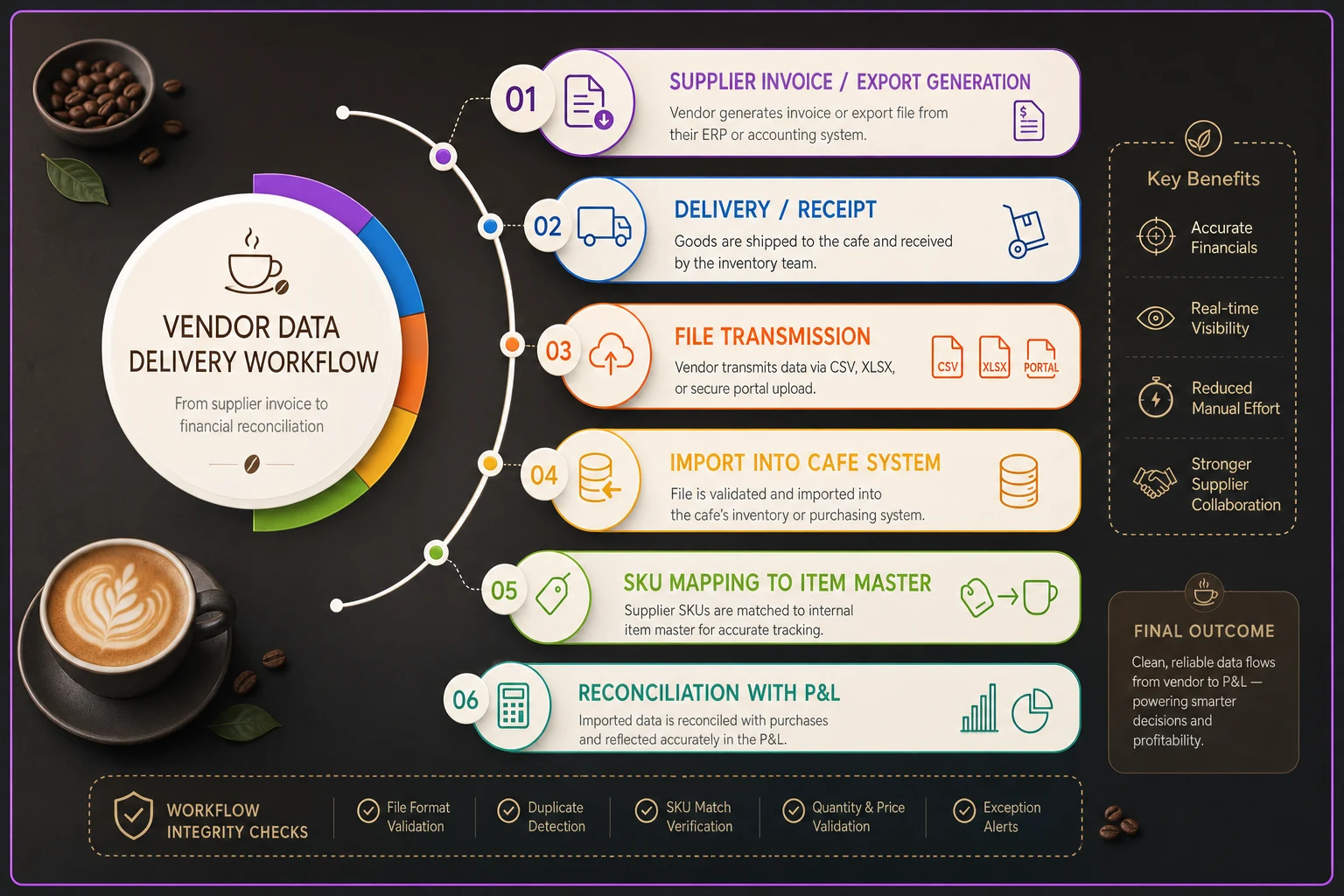
Use a simple flow with labelled handoffs and who is accountable at each step.
Part 3: Minimal SLA language
Most small vendors won't sign a long SLA, and you don't need one. You need a few sentences that turn the field spec and cadence into obligations with a consequence attached, even a mild one.
``
DATA SERVICE COMMITMENTS

a) Completeness. Files delivered under this agreement will contain
   the fields listed in the Vendor Data Requirements. Missing or
   blank required fields will be corrected and resent within
   2 business days of notice.

b) Stable identifiers. Item codes, location IDs and transaction IDs
   will not be reused or reassigned. A change in pack size, unit
   count or product formulation will be issued under a new item code.

c) Price notice. Price increases not communicated per the Data
   Delivery Schedule will be honored at the prior price for the
   first delivery on which they appear.

d) Format changes. Changes to export structure require 30 days'
   written notice. If a change is made without notice, Vendor will
   provide the prior format on request until the notice period
   has passed.

e) Data access and portability. Customer owns its transaction,
   item, staff and customer data. Vendor will provide a complete
   export in CSV within 14 days of request and within 14 days of
   termination, at no additional charge.

f) Corrections. Errors in invoices or exports identified by either
   party will be corrected through a credit or revised file that
   references the original document.
``
Clause (c) is the one that gets negotiated. Many suppliers will push back, and the compromise is often "honored for orders placed before notice." That's fine. What matters is that a surprise price increase costs the vendor something, which changes how carefully they send notices. Without it, notice is optional in practice.
Clause (e) matters most with software. Getting your data out is much harder after you've given notice than before. Some platforms limit history exports to 90 days, or charge for "data migration services." The time to find that out is during the demo, which brings us to the test.
Part 4: The three-step acceptance test
A manager can actually run this. It fits in a demo call or a first delivery week, and it shows whether the vendor can meet the spec before you're committed.
-
The sample file test. Ask for a real export or invoice file covering at least two weeks, from an existing customer account (anonymized) or from your trial period. Don't accept a screenshot or a sample "template." Open it and check it against the field spec line by line. Are IDs present? Is pack size separate from the description, or buried in text like "OAT BARISTA 6/64Z"? Is there a timezone on timestamps? Are refunds their own rows tied to the original transaction, or just negative numbers? Write down every missing field and count them. If more than three or four required fields are missing, the vendor's system probably doesn't store them, and no promise will change that.
-
The tie-out test. Take three specific records and make them agree with something outside the vendor's system. For a supplier, pick three invoices and confirm that line totals × quantities = invoice total = what hit your bank or AP. For a POS or delivery platform, pick three business days and confirm the export totals match the vendor's own dashboard summary and the payout deposit. If the vendor's export doesn't match the vendor's own dashboard, stop there. You'd spend hours every month reconciling their numbers against their numbers.
-
The change test. Ask the vendor to show you, live or in writing, what happens when something changes. Rename an item in the POS, run the export, and see whether the
item_idstays the same. Ask the supplier what happens to the SKU when they change case pack. Ask the software rep where a schema change notice would come from and who receives it. Do a refund in the demo and look at how it appears. This catches the stuff that otherwise won't surface for months, and vendors who've thought about it answer quickly. Vague answers like "our system handles that" are a signal.
A vendor that passes all three cleanly is rare, so in practice you're grading them. Passing step 2 is close to non-negotiable. Steps 1 and 3 tell you how much manual cleanup you're signing up for.
Paste-ready email for vendors
This works for an existing supplier you want to bring onto the spec, or a new software vendor before a demo. Edit the bracketed parts.
It's split into a few chunks so the lists stay readable when you paste into Gmail or Outlook. Send them in order as one email.
Subject: Data requirements for [Cafe Name] — please review before [date] Hi [Name],
-
The fields we need on invoices / exports
-
When we need them
-
A few basic commitments on notice and corrections
Before [date / our demo], could you:
-
Send a real sample file covering two weeks (anonymized is fine)
-
Confirm which fields in the appendix you can and can't provide
-
Let us know who on your side we should contact about file format changes
This isn't meant to be a big process. Most of it is probably stuff you already have. We just want it written down so nothing slips when people change on either side.
Thanks, [Name] [Role, Cafe]
Tone matters here. Framing it as "standardizing across all vendors" keeps it from feeling like an accusation, and asking which fields they can't provide gets you honest answers faster than asking them to confirm everything.
Real scenario: two cafes, one dairy supplier, and a pack change nobody caught
Business: Two-location independent cafe, roughly 450–550 drinks a day combined, one part-time bookkeeper shared across both sites, one owner running purchasing.
Problem: The dairy and alt-milk supplier delivered three times a week to each site with PDF invoices. Partway through spring, they changed their barista oat milk from 12×32oz to 6×64oz cases. Same total volume, same SKU, but a higher case price, around 8% more. Separately, they started substituting a different whole milk brand at one site on short-stock days, noted only as handwritten text on the delivery slip.
For about three months, recorded COGS ran consistently above theoretical cost. The unexplained gap was roughly $450–$600 a month across both sites. The owner assumed it was waste at the busier site and tightened pouring standards, which didn't move the number. Meanwhile the bookkeeper was spending five or six hours a week matching invoices to receiving notes and rekeying line items by hand.
What changed: The owner sent the vendor email above with the product supplier appendix. It turned out the supplier's portal already produced CSV invoice exports with pack size as a separate column. Nobody had ever asked for them. The supplier agreed to issue new SKUs on pack changes and to email substitutions before dispatch. They wouldn't accept the price-notice clause as written, but settled on "prior price honored for orders placed before notice."
The bookkeeper switched from rekeying PDFs to importing CSVs, mapped once against the cafe's internal item list. With pack size feeding straight into cost-per-ounce, the oat milk issue showed up within the first week.
After roughly two months: Invoice processing dropped to about 1.5–2 hours a week. The unexplained COGS gap shrank to under $150 a month, mostly real waste this time. Recipe costs on all the oat milk drinks got updated, and two drinks got a small price bump. The owner also stopped blaming the busier site's team, which mattered more than they expected.
The supplier wasn't hiding anything. The data existed. It just wasn't requested in a usable shape, and nobody had written down that a pack change means a new code.
When this actually makes sense
The appendix earns its keep when a vendor represents a meaningful chunk of your COGS or revenue flow: your main food distributor, dairy, coffee roaster, POS, and any delivery platform doing real volume. It's also worth doing at certain moments, like signing a new vendor, renewing a contract, opening a second site, or when a COGS variance has gone unexplained for more than a month or two.
It's especially useful when more than one person handles vendor data. If receiving, entry and reconciliation are done by different people, the contract is the one place the expectations live that doesn't depend on any of them remembering.
It also slots into a broader vendor decision process. If you've already set decision rights for who can approve new tools and suppliers, like the ones in the operator-first technology governance framework, the acceptance test becomes a natural gate. Nobody signs until the three steps are done.
When this is a bad idea
Sending a full appendix to a small artisan vendor who delivers a few items a week is usually counterproductive. A one-person bakery that does beautiful work and sends handwritten invoices may just stop selling to you. For those vendors, ask for two things: an emailed invoice with item, quantity and price, and a text before any substitution. Enforce it gently.
Don't send this mid-crisis either. If a supplier is already struggling to fill orders during a shortage, pushing data requirements on them signals you care more about paperwork than getting product. Wait until things settle.
And don't use the SLA clauses as a weapon over small misses. The goal is stable data, not collecting credits. If you invoke clause (c) every time a notice comes a day late, you'll get worse service on everything else.
Who should NOT do this (yet)
A single-site cafe with a handful of vendors, where the owner personally receives, enters and reconciles everything, probably doesn't need the full spec. Keeping the context in one head works at that size. A short version with stable SKUs, CSV invoices and price notice is plenty.
Cafes without an internal item list shouldn't start here either. The appendix assumes you have something to map vendor data onto. If your inventory and recipe costing aren't set up yet, a perfect vendor file just lands in a spreadsheet nobody uses. Build the internal item master first, then ask vendors to meet it.
And if nobody on your team will actually open the files, skip it. A spec that produces data no one reads is worse than no spec, because it creates a false sense that things are under control.
Before you sign: quick checklist
Keep this next to you during a demo or a vendor call. Most of it can be checked in under an hour if you have a real sample file open in front of you.
-
Vendor has provided a real sample file, not a template or screenshot
-
Pack size and unit size are separate fields, not buried in descriptions
-
Item IDs stay the same when items are renamed (tested, not promised)
-
SKU changes are tied to pack size or formulation changes, in writing
-
Timestamps include a timezone; business date is exported separately
-
Refunds and credits reference the original transaction or invoice
-
Platform fees appear as their own lines, not netted out of sales
-
Price change notice period agreed, even if shorter than 7 days
-
Schema change notice period agreed, with a named contact on their side
-
Full data export available on request and on termination, in CSV, without extra fees
-
Three tie-out records matched against bank, AP or the vendor's own dashboard
-
Someone at the cafe is named as the owner of each vendor's data feed
If the first four aren't ticked, I wouldn't sign yet. Notice periods and fee wording can be negotiated down the road, but a missing sample file or unstable IDs usually can't be fixed later.
Where software fits, and where it doesn't
Even with a good appendix in place, someone still has to check each file against the spec, map vendor SKUs to internal items, and notice when a field goes blank. It's tedious, and it's exactly the kind of work that slips during a busy week, which is also when vendors are most likely to substitute or change things.
This is where AI-assisted operational platforms have been genuinely useful in the cafes we've worked with. They don't replace the contract, they enforce it in the background. An incoming invoice file gets checked against the field spec automatically. A new vendor SKU gets matched to a likely internal item and flagged for a human to confirm, instead of silently creating a duplicate. A price that jumps past a set threshold without a matching notice gets surfaced to the owner before the invoice is approved. A POS export missing a column after an update triggers an alert the same morning, not two weeks later.
Map your highest-volume SKUs to the internal item master first so the automated matching reduces most manual work quickly.
What software can't do is get a vendor to send data they don't have, or decide which vendors are worth pushing. Those are still judgment calls, and the acceptance test is where you make them.
Start small
Vendor data problems in cafes rarely look like data problems. They look like rising food cost, a team that "can't control waste," a bookkeeper who's always behind, or a software switch that takes three months longer than planned because the old system won't release your history. The root cause is usually the same: nobody wrote down what the data should look like, when it should arrive, or what happens when it changes.
The appendix above is deliberately small. Start with your two or three biggest vendors and send the email. Run the acceptance test at your next renewal or demo. Expect some pushback and some partial wins. A distributor who only agrees to stable SKUs and CSV invoices has still removed one of the most common sources of silent COGS drift. As you add sites, the spec is what keeps every location's numbers comparable without you personally translating between them. Revisit it once a year, because your vendors' systems change even when nobody tells you.
Ready to brew operational excellence?
Join hundreds of coffee shops using Coffehq to boost efficiency, reduce waste, and elevate customer satisfaction.